How to Write a PRD With ChatGPT: Prompts and Pitfalls
· 7 min read
You can draft a product requirements document (PRD) with ChatGPT, but only if you give it your own material and ask for one section at a time. Prepare the facts first, paste them in, and prompt for each section with the instruction to mark what is missing instead of guessing. Below is a prompt sequence you can copy, how to make the output specific, and the failure patterns to check. The same process works in any chat assistant.
What to prepare before prompting
The quality of a draft depends on what you give the model. A chat assistant has no knowledge of your project, so a request such as "write a PRD for a field service app" returns a plausible document about an imaginary product. Collect the real material first:
- The sources: notes from calls, the brief, an old spec, emails with decisions. How to turn meeting notes and decks into requirements describes how to label and clean them.
- Facts you already know: the users, the goal and the number behind it, the date, the budget range, the systems it must work with.
- Constraints: what cannot change, such as a data location, an existing login or a platform.
- A template: a list of the sections you want. The software requirements document template is one; if you are unsure which kind of document you need, PRD vs BRD vs SRS explains the difference.
Before you paste anything, check what you are allowed to share. Client documents may be covered by a contract, and a personal chat account is not the same as a business product. The questions to ask about storage, training use and sub-processors are in client documents in AI tools: a checklist for agencies.
A prompt sequence for each PRD section
Start one conversation and keep it for the whole document, so that earlier answers stay in view. Open with a rule that applies to everything after it:
You are helping me draft a product requirements document.
Use only the material I paste in this conversation.
If something is missing, write "UNKNOWN: <what is needed>" instead of guessing.
Never invent names, numbers, dates or targets.
For every statement taken from my material, add the sentence it came from in quotes.
The "UNKNOWN" instruction and the request for quotes are there because models fill gaps with confident text. Anthropic's guidance on reducing hallucinations suggests allowing the model to say it does not know and asking it to support claims with quotes (reducing hallucinations). The advice is general and works with other assistants too.
Then paste your material and go through the sections in order, reviewing each before moving on.
1. Problem and goals
From the material above, draft the problem statement in 3 to 5 sentences.
Then list up to 3 goals. Each goal needs a metric, its current value, a target
and a date. If any of these is missing, write UNKNOWN for that part.
2. Users
List each type of user and the system actors (other systems the product talks to).
For each: role, what they need to get done, and current pain points,
each with its source quote. Do not add users that are not in the material.
3. Scope: in, out and later
Propose an in / out / later list for the first release, based only on the goals
and users above. Mark every item that is your assumption, not something
I wrote. I will correct the list.
4. Requirements
For each item in the "in" list, write requirements as one testable behaviour each:
ID, title, one sentence in the form "<actor> can <action> so that <result>",
type (functional, non-functional, constraint), and a proposed priority
(Must, Should, Could) with a reason. Then write two or three acceptance
criteria per requirement. Put UNKNOWN where a number is needed and not given.
5. Non-functional needs and constraints
Go through these areas and write a requirement only if the material mentions it;
otherwise list it under "Questions to ask": performance, security, availability,
accessibility, data location, compliance, supported devices.
6. Success metrics, risks and open questions
List the open questions, assumptions and risks you found while writing the
sections above. For each, give a suggested owner role and what would answer it.
Finally, ask for the assembled PRD in your template, with all UNKNOWN markers kept. A PRD with a visible list of what is not known is more useful than one that looks complete.
Making the output specific
Generic output is the usual disappointment. These changes make it sharper:
- Give examples of what you want. Paste one good requirement from your own project and ask the model to match its shape and length.
- Ask for the failure case. "For each requirement, add one acceptance criterion for what happens when it fails."
- Put numbers in, or let the model mark them. "Fast" is not a requirement. If you have a number and a condition, include it; if not, ask for UNKNOWN.
- Work in small pieces. A request for ten requirements gets better results than a request for the whole document, and it is easier to review.
- Ask it to criticise. After a section, ask: "Which of these requirements cannot be tested as written? Which contradict each other?" The answers are prompts for your attention, not proof.
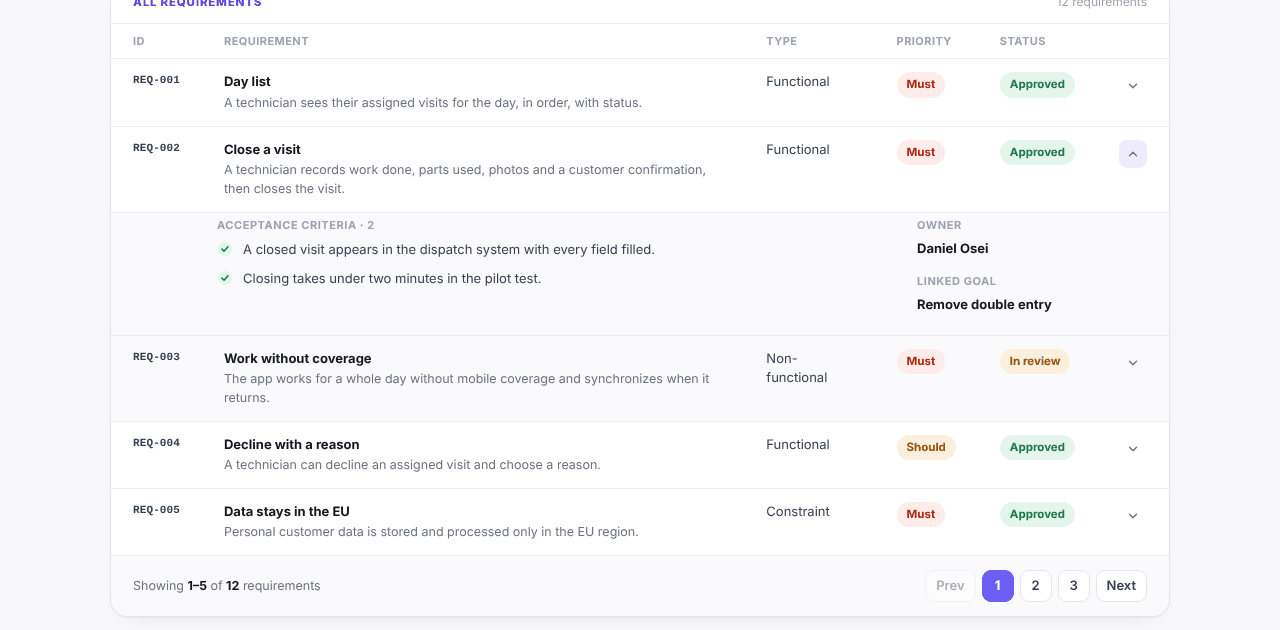
Functional requirements examples shows weak and strong wording side by side, which is useful to paste as a reference. Here is the shape to aim for, as it looks as a record: an ID, a one-line description, a type and priority, and acceptance criteria that can be checked. The project in the picture is invented.
Failure patterns to check
Read every draft with these in mind:
- Generic requirements. "The system shall be secure and user-friendly." If it could be pasted into any project, it carries no information.
- Invented facts. A metric with a target nobody set, a stakeholder with a job title you never mentioned, a date that appears nowhere. Trace every number and name to a source, or delete it.
- Missing constraints. The model rarely raises data location, legacy systems or who maintains the product afterwards unless you ask.
- A tidy surface over gaps. Fluent text hides what is unknown. This is why the UNKNOWN rule matters.
- Lost context in a long thread. In a long conversation, early material may fall out of view, and sections drift apart. Re-paste the facts when you change a section, or ask the model to list what it is using.
- Conflicts between sources. When two documents disagree, a model may silently choose one. Ask it to list conflicts, and decide with the client which is current.
- Priorities that all say Must. Check the share. A common rule of thumb is that Musts should be no more than about 60% of the work, as the MoSCoW prioritization guide explains.
A longer routine for checking any AI draft is in AI for software discovery.
When to move to a structured tool
A chat assistant handles one document well. The limits appear when the work grows:
- The discovery lasts weeks, and sources change.
- Several people review and edit.
- You need the goals, requirements, decisions and estimate to stay consistent when one changes.
- You need records with IDs, priorities and owners, not paragraphs.
- You need a report to hand to a client.
At that point you are copying text in and out of a thread and keeping the links in your head. A tool built for the whole discovery keeps the stages linked and drafts them from your files, but it is a different kind of tool. Discovery Phase AI vs ChatGPT compares the two on the points where they differ and where a chat is the better choice. For a small discovery done by one person in a few days, a chat assistant and a template are enough.