AI for Software Discovery: Where It Helps and Where It Fails
· 7 min read
AI is good at the slow, mechanical part of discovery: reading a pile of decks, transcripts and notes, and turning them into a first draft of goals, users, journeys and requirements. It is bad at knowing what nobody wrote down, and it can state invented details with complete confidence. Used well, it gives you a draft in minutes that a person then checks line by line against the sources; the decisions stay with people.
Where AI helps in discovery
Most discovery time goes into finding, sorting and restating information that already exists somewhere. That is where a language model earns its place.
- First drafts from existing material. A sales deck, an old spec and three call transcripts already contain most of the background, stakeholders and stated needs. A model can pull them into a structured draft far faster than a person retyping them.
- Restructuring. Turning a rambling meeting note into a list of users with goals and pain points, or a paragraph of wishes into separate requirements with a type and priority.
- Spotting gaps. Asking "which requirements have no acceptance criteria?" or "which goals have no metric?" is a mechanical check a model does quickly.
- Consistency checks. Comparing stages for contradictions: a requirement that conflicts with a stated constraint, a journey step that no requirement covers.
- Rewriting for the reader. Shortening a section into an executive summary, or rewriting a vague requirement into a testable one for you to approve.
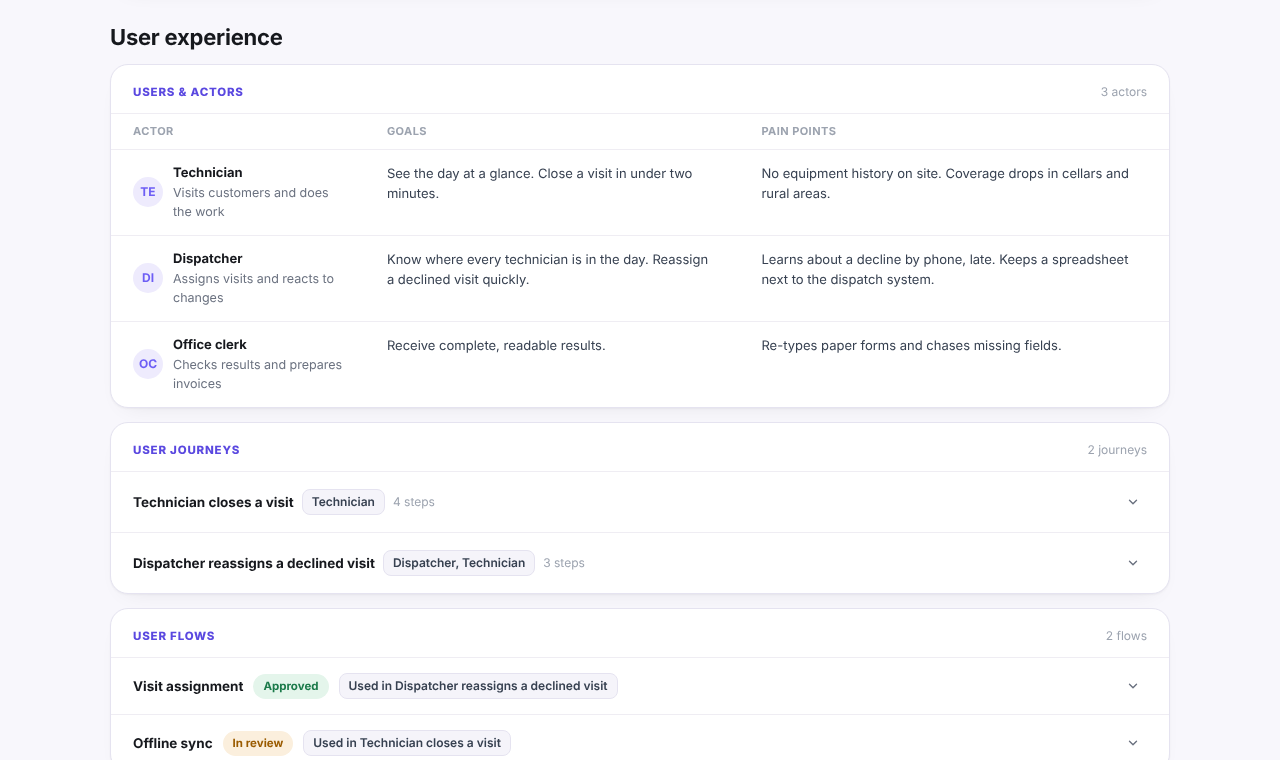
Here is the kind of structure that a draft should end up in: users with their goals and pain points, and journeys that name those users. The project is invented (it is called Fieldwise, from the public example report):
Where it fails: invention, missed context, over-confident text
The failures are predictable, which makes them manageable.
Invention. NIST's generative AI profile calls this confabulation: "the production of confidently stated but erroneous or false content" (NIST AI 600-1). In discovery it looks like a metric with a target nobody set, a stakeholder's job title filled in from a guess, or an acceptance criterion with a precise threshold that appears in no source.
Missed context. The model only knows what you give it. The political reason a previous project failed, the manager who will block anything that touches their team, the integration everyone assumes but nobody documented: none of that is in the files.
Filler. Asked to produce a complete-looking document, a general assistant tends to pad empty sections with generic text ("ensure a seamless user experience") that sounds fine and says nothing.
Over-confident tone. A draft written in fluent, certain prose is harder to question than a rough note. The polish hides which parts came from a source and which were inferred.
Mixed-up sources. When several documents disagree (an old deck says three regions, a newer call says two), a model may silently pick one or blend them.
A verification routine
A short routine catches most of these problems. Run it before anything goes to a client.
- Trace every number and name. For each metric, date, figure and person in the draft, find where it came from. If you cannot, delete it or mark it as an open question.
- Ask for quotes. Ask the model to back each requirement with the sentence from the source that supports it. Anthropic's guidance on reducing hallucinations recommends exactly this: extract word-for-word quotes first, and retract any claim that has no supporting quote.
- Allow "I don't know". Tell the model that an empty section is better than a guessed one. The same guidance notes that giving explicit permission to admit uncertainty reduces false information.
- Check the empty sections. An empty section is useful information: it tells you what to ask in the next interview.
- Look for conflicts between sources. Where two documents disagree, write down both versions and ask the client which is current.
- Read it as the client would. Would the decision maker recognise every statement as true? Anything that would surprise them needs a source or a question.
- Keep a record of changes. Know which parts were AI-drafted, which a person edited, and what changed after each new input.
Inputs matter: decks, transcripts and notes
The draft can only be as good as its inputs. Different sources carry different kinds of truth.
| Input | Good for | Watch for |
|---|---|---|
| Sales or pitch decks | Background, goals, the client's own framing | Aspirations stated as facts; old numbers |
| Call and workshop transcripts | Real needs, pain points, priorities in the client's words | Off-hand ideas taken as requirements; who said what |
| Existing specs and tickets | Concrete requirements and constraints | Out-of-date decisions that were later reversed |
| Spreadsheets | Figures, lists of users, data volumes | Formulas and context lost when read as text |
| Diagrams and screenshots | Current flows and systems | Partial pictures that look complete |
| Your own notes | Context nobody else wrote down | Your assumptions presented as the client's |
Three habits improve the result more than any prompt: give the model the newest version of each document, remove material that is clearly obsolete, and add a short note of your own with what you know that is not in the files.
Also check what happens to the files. Discovery material often contains a client's plans, names and figures, so find out where a tool sends it, whether it is stored, and whether it is used for training.
What stays a human decision
AI can propose; people decide. These parts of discovery should never be left to a model:
- Which goal matters most, when stakeholders disagree.
- What is in, out and later for the first release.
- Priorities, especially which requirements are Musts.
- Architecture choices, and the trade-offs behind them.
- The estimate range and the assumptions you are willing to stand behind.
- What to tell the client about risks, and when.
- Whether the project should go ahead at all.
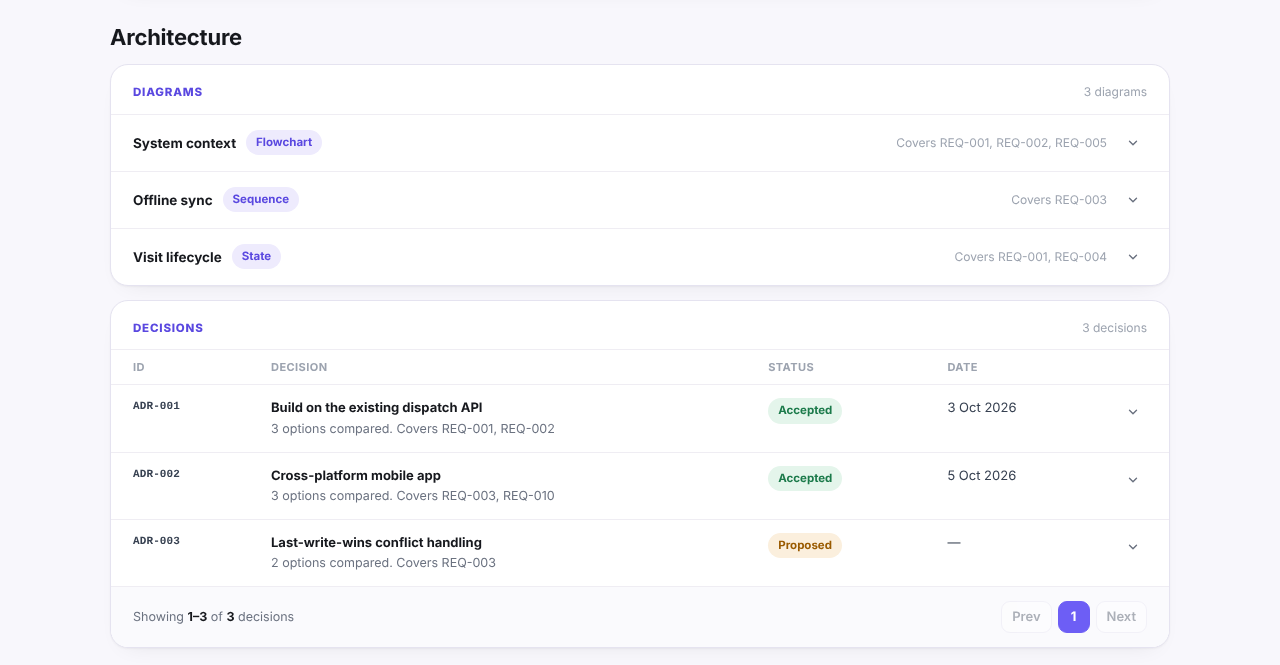
Decisions are worth recording with the options that were compared, so the reasoning survives after the meeting. The same example report keeps them as numbered decision records next to the diagrams they affect:
Choosing a tool: questions to ask
A general assistant such as ChatGPT can do much of the drafting if you paste the material in and follow the routine above. A tool built for discovery should save you some of that routine. Either way, these questions help:
- Does it say when something is missing, or does it fill every section?
- Can you see and approve each proposed change before it is saved, or does it rewrite the document?
- Does it keep the result structured (requirements with priorities and acceptance criteria, goals with metrics), or produce one long text?
- Does it check consistency across sections when something changes?
- What happens to your files: are they stored, who processes them, are they used for training?
- Can text inside a document steer the AI? A file can contain instructions; a careful tool treats file content as data.
- Can you export the result in the formats your client reads?
As one example of how a dedicated tool answers these: Discovery Phase AI reads uploaded files in memory without storing them, is instructed to leave a section empty rather than invent facts, names or numbers, and shows each drafted item with a checkbox so nothing is saved until you choose it. Every later AI suggestion is a proposal you apply or reject. Its security page describes how files and AI requests are handled, including that the AI provider does not train on the content under its commercial terms. None of that removes the need for the routine above; it just makes it shorter.