Discovery Phase AI vs ChatGPT: An Honest Comparison
· 8 min read
ChatGPT is a good tool for drafting parts of a discovery phase: a problem statement, a first list of requirements, a summary of a call. Where it struggles is keeping a whole discovery together, with ten connected stages, changes over several weeks and one document at the end. A purpose-built tool such as Discovery Phase AI is worth it when that second job is what costs you time. If it is not, a chat assistant and a good template will do.
This comparison is written by the team behind Discovery Phase AI, so read it with that in mind. We have tried to be fair about where a general assistant is the better choice.
What ChatGPT does well for requirements
A general chat assistant is flexible, and for many discovery tasks flexibility is what you need.
- First drafts from rough input. Paste meeting notes or a brief and ask for a problem statement, a list of user types or ten candidate requirements. You get something to react to in seconds.
- Rewording. "Make this requirement testable" or "rewrite this for a non-technical sponsor" are tasks it handles well.
- Thinking out loud. Asking "what am I missing for a booking system?" often surfaces edge cases such as cancellations, time zones and refunds.
- Any format. It will produce a table, a user story, a Mermaid diagram or an email, depending on what you ask for.
- Files. Current versions can read uploaded documents, and some plans let you keep chats and files together in a project.
If your discovery is small (one person, a few days, a short document), this may be all you need. Pair it with a structure such as the discovery phase template so nothing important is skipped.
Where a chat thread runs out
The limits show up when the discovery grows, lasts longer or involves other people.
The structure lives in your head. A chat answers the prompt it is given. It does not know that your discovery should have stakeholders, goals with metrics, journeys, requirements, architecture decisions and a roadmap, unless you tell it every time or keep that structure in a template yourself.
Answers do not know about each other. You might agree on a goal in one conversation and write requirements in another. Nothing warns you when a requirement contradicts a figure in the goals, or when a journey step has no requirement behind it. The longer the thread, the more of the early material falls out of view.
Edits are copy and paste. You copy a draft out of the chat into a document, change it by hand, paste it back to ask for an improvement, and copy the result out again. There is no record of what changed, who changed it or why.
Records are not records. A requirement in a chat is a paragraph. It has no ID, no priority field, no owner, no link to the goal it serves. You can ask for all of these as text, but you have to keep them consistent yourself.
The final document is your job. Someone has to assemble the report, format it and keep it in sync with the latest changes.
None of this makes the chat bad at its job. It is a general assistant, and keeping a multi-stage project consistent is a separate job.
What a structured discovery tool adds
Discovery Phase AI is built for that second job. Here is what it does differently, stated only as far as the product does it today.
| Need | General chat assistant | Discovery Phase AI |
|---|---|---|
| Structure | You bring it, or keep a template | Ten guided stages, from stakeholders to roadmap, each with a hint on what belongs there |
| Starting point | Paste text or upload files into a chat | Upload decks, documents, transcripts or images when you create a project; the AI drafts the stages and you keep, edit or uncheck each item |
| Records | Paragraphs of text | Requirements with ID, type, MoSCoW priority, status, owner, linked goal and acceptance criteria; milestones with effort ranges and dependencies |
| Consistency | Nothing flags a contradiction | Check impact reads the whole project and lists conflicts, outdated content, gaps and broken links |
| Edits | Copy and paste | The assistant proposes changes; you apply them one record at a time, and removals ask you to confirm |
| History | None | Every change is journaled, with AI and file-update changes labelled; paid plans can restore earlier stage versions |
| Output | You assemble it | One discovery report from the completed stages, exported as Markdown, or PDF, Word and PowerPoint on paid plans |
Two details matter for client work. Uploaded source files are analyzed in memory and not stored, and each company's workspace is separate from the others. The security page lists what is stored, who can see it and which providers handle data.
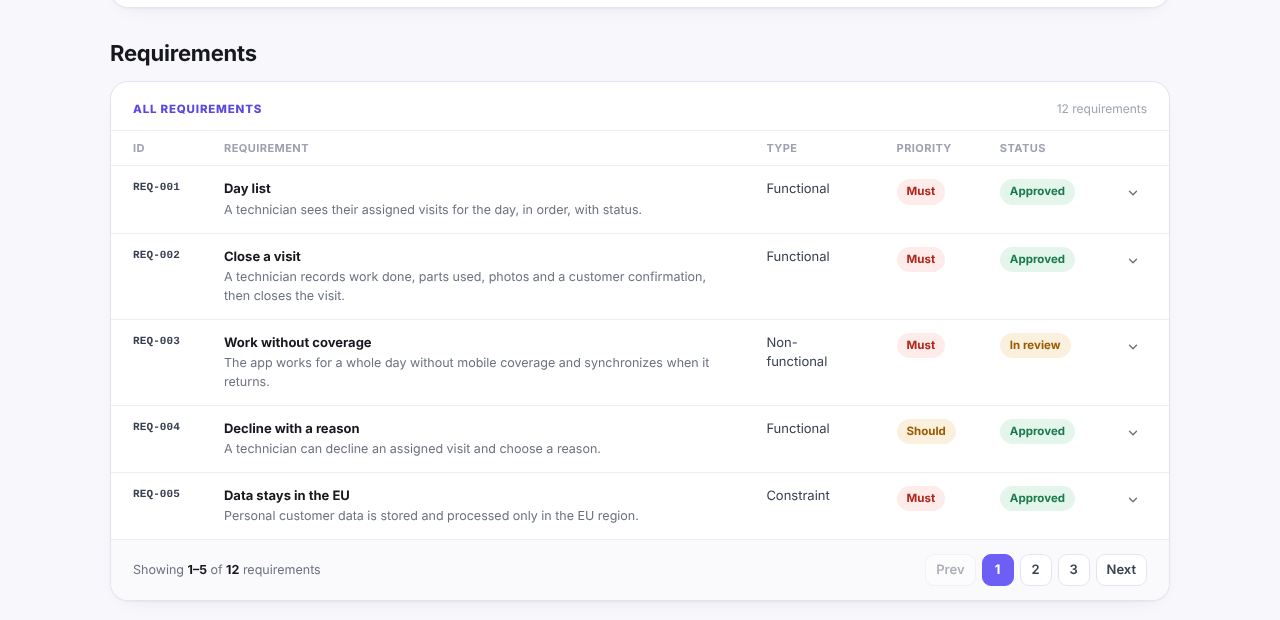
This is the difference in practice. In the requirements section of the example report, each requirement is a record with an ID, a type, a priority and a status, rather than a paragraph in a thread:
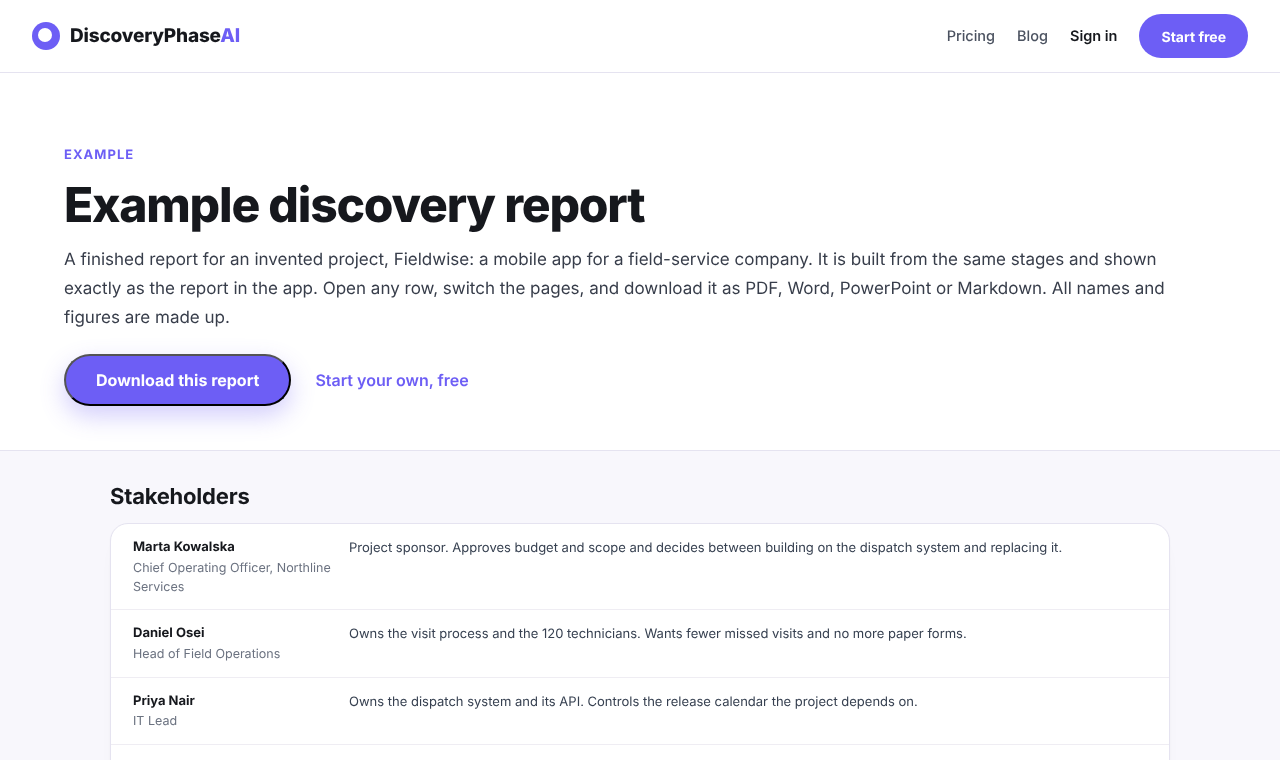
To see what the end result looks like, the example report shows a complete discovery for an invented project called Fieldwise, a mobile app for field technicians. Every name and figure in it is made up. It opens with the stakeholders and continues through every completed stage:
What it does not add (still needs your judgement)
A structured tool does not replace the parts of discovery that are about people.
- It does not run interviews. It works from what you upload or type. If nobody asked the dispatcher what goes wrong on a Monday morning, the tool will not know either.
- It does not decide. It can point out that two requirements conflict. Choosing which one wins is a conversation with the sponsor.
- It does not invent facts on purpose, and that cuts both ways. The file analysis is instructed not to make up names, numbers or targets, so a goal with no stated metric comes back without one. That is correct, but it means gaps stay gaps until someone fills them.
- It can still be wrong. Any AI output, from ChatGPT or from a dedicated tool, needs review. Scores and suggestions are prompts for your attention, not proof of quality.
- Estimates stay estimates. A roadmap with person-week ranges is only as good as the assumptions written under it.
Cost and plan limits
Both options have a free tier and paid plans, and both change their prices from time to time, so check the current pages before you decide.
ChatGPT's individual paid plan has been widely reported at about $20 a month, with business plans priced per seat. OpenAI's own pricing page is the place to confirm.
Discovery Phase AI's Free plan needs no card and includes three active projects, one file of up to 10 MB per upload, 50 AI credits a month and Markdown export. Pro is $19 a month for one person, with unlimited active projects, up to ten files per upload, 1,000 credits a month, PDF, Word and PowerPoint export and stage versions you can restore. Team and Agency plans add more seats and, for Agency, several client companies under one subscription. Full details are on the pricing page.
The cost that matters more is time. As a rule of thumb, if you spend more of a discovery copying, reconciling and formatting than thinking, the structured tool pays for itself. If you mostly need quick drafts, it probably does not.
Which one to use for which job
| Job | Better fit |
|---|---|
| A quick brainstorm or a one-off rewrite | ChatGPT |
| A short discovery done by one person in a few days | ChatGPT with a template |
| Turning a pile of decks and transcripts into a first draft of every stage | Discovery Phase AI |
| A discovery that changes over several weeks | Discovery Phase AI |
| Work several people review or edit | Discovery Phase AI |
| A polished report for a client or a board | Discovery Phase AI |
| Exploring an unfamiliar domain before you know what to ask | Either; a chat is often faster to start |
Many teams will use both: a chat assistant for open-ended thinking, and a structured workspace for the record that people sign off. If you are new to the process itself, start with what a discovery phase is in software development and then decide which tool fits the size of your project.