How to Turn Meeting Notes and Decks Into Requirements
· 8 min read
To turn call transcripts, slide decks and emails into requirements, work in five passes: collect and label every source, pull out statements, decisions and questions, rewrite each need as one testable line, record what is still unknown, and keep a link from each requirement back to where it came from. AI can do much of the first pull for you, but you still have to check every line it produces against the source.
The method below works with a spreadsheet and a highlighter. The last section covers where AI speeds it up and where it needs a careful eye.
The problem with raw meeting material
Meeting material is full of requirements, but almost none of them are written as requirements.
- Needs hide inside stories. "Last winter our technicians had no signal in the basements and lost a whole day of forms" is a requirement for offline work, told as a complaint.
- Solutions arrive before problems. "We want a dashboard" is a solution. The need behind it (a supervisor has to see late visits before 10:00) is what you should record.
- Decisions get lost. A choice made on a call ("we will keep the existing dispatch system") is a constraint for everything after it, but it often lives in one line of a transcript.
- Sources disagree. The sales deck promises same-day reporting; the operations lead says weekly is fine. Both end up in your notes.
- Volume. An hour-long call produces a transcript of several thousand words. A few calls and a couple of decks are already more than anyone rereads.
The goal is not to summarize all of it. It is to extract the parts someone will build and test, and to make the rest visible as questions.
Step 1: collect and label the sources
Before reading anything closely, put every source in one list and give it a short label.
| Label | Source | Date | Who spoke or wrote it |
|---|---|---|---|
| T1 | Kick-off call transcript | 3 Mar | Sponsor, ops lead, IT lead |
| T2 | Call with dispatch supervisors | 6 Mar | Two supervisors |
| D1 | Sales deck, "Field app vision" | Feb | Sales director |
| E1 | Email thread on the dispatch API | 4-7 Mar | IT lead, vendor |
The labels matter later. Every requirement you write will carry one or more of them, so anyone can check where it came from and who said it. Note who was in each conversation, because a statement from the person who approves the budget weighs differently from a passing comment.
If a source is a recording without a transcript, transcribe it first. Working from memory of a call is where invented requirements come from.
Step 2: pull out statements, decisions and questions
Read each source once and mark three kinds of line. Copy each into a working sheet with its source label and, if you can, a short quote.
- Needs: something a user or the business must be able to do, or a quality it must have. "Supervisors need to see which visits are late."
- Decisions and constraints: things already settled or not negotiable. "We keep the current dispatch system." "Data must stay in the EU." "Launch before the summer season."
- Questions and doubts: anything unclear, contested or assumed. "Do subcontractors use the app too?" "Is weekly reporting enough, or same-day?"
Do not rewrite yet. Keep the speaker's words. At this stage you want coverage, not polish, and the quotes will help you settle arguments later ("the ops lead said X on 3 March").
When two sources say different things, record both and add a question. Do not choose silently.
Step 3: rewrite them as testable requirements
Now turn each need into a requirement that a tester could pass or fail. A good line is short, covers one thing and states an observable result. The requirements standard ISO/IEC/IEEE 29148 lists qualities such as necessary, singular, unambiguous and verifiable; in practice, "can someone check this?" catches most problems.
One simple pattern, from the EARS approach developed at Rolls-Royce, is: When [trigger], the [system] shall [response].
| Raw note (source) | Requirement |
|---|---|
| "No signal in basements, lost a day of forms" (T1) | The technician app shall let a technician record a visit without a network connection and sync it when the connection returns. |
| "Supervisors find out about declines by phone, too late" (T2) | When a technician declines a visit, the dispatcher board shall show the visit as unassigned with the decline reason within one minute. |
| "We keep the current dispatch system" (T1, E1) | Constraint: visits shall be created and closed in the existing dispatch system through its API. |
| "Customers dispute that we were there" (T2) | The app shall capture the customer's signature and attach it to the closed visit. |
These examples are invented for this article. Then add the fields that make a requirement manageable:
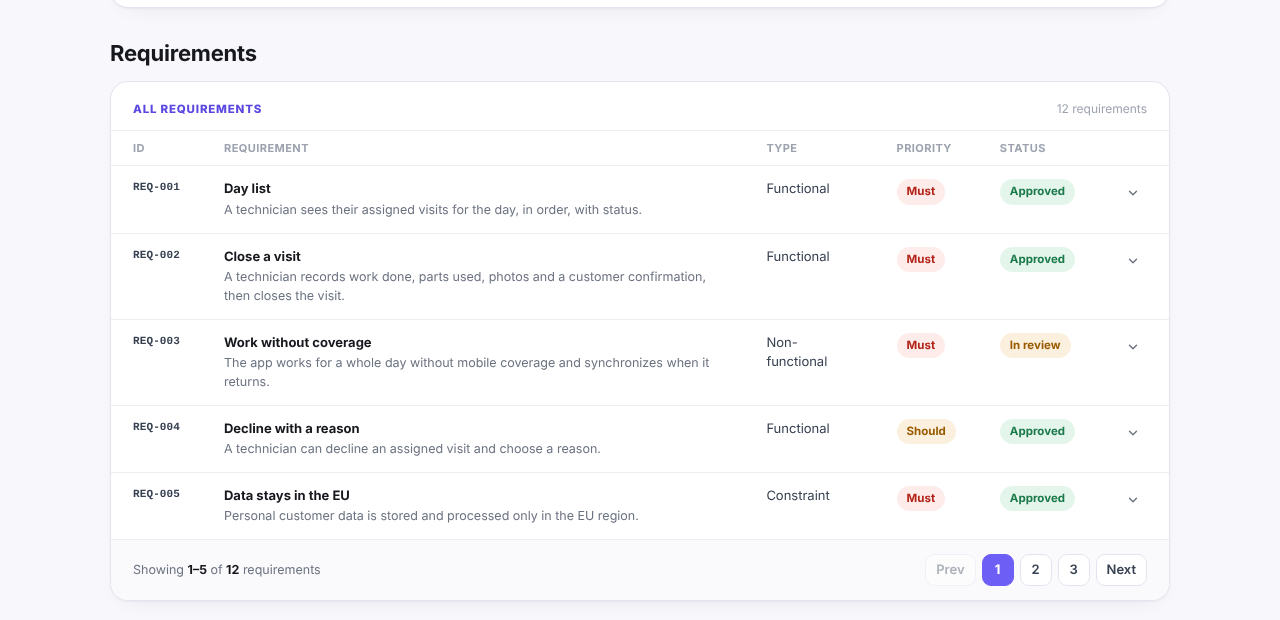
- Type: functional, non-functional or constraint.
- Priority: MoSCoW (Must, Should, Could, Won't), agreed with the sponsor rather than guessed.
- Acceptance criteria: one to three checks. "Works offline" becomes "a visit recorded in flight mode appears in the dispatch system within five minutes of reconnecting".
- Source: the labels from step 1.
- Goal: the business goal it supports, if there is one.
If a number in an acceptance criterion did not come from a source, mark it as a proposal. "Within one minute" should be confirmed by someone, not quietly adopted.
Here is what the result can look like once the lines are numbered and typed. This is the requirements section of an example report for Fieldwise, an invented field-service app; every name and figure in it is made up:
Step 4: record what is still unknown
Most of the value of this exercise is in what you could not write. Every question from step 2, and every requirement you had to guess at, goes into an open questions log.
For each item record:
- the question in one sentence;
- why it matters (which requirement or estimate depends on it);
- who can answer it;
- by when, and what you will assume until then.
Example: "Do subcontractors use the app? Affects login, permissions and licence count. Ask: ops lead. Until answered: assume employees only."
In the same invented Fieldwise project, open questions sit next to risks and blockers, each linked to the stage it affects:
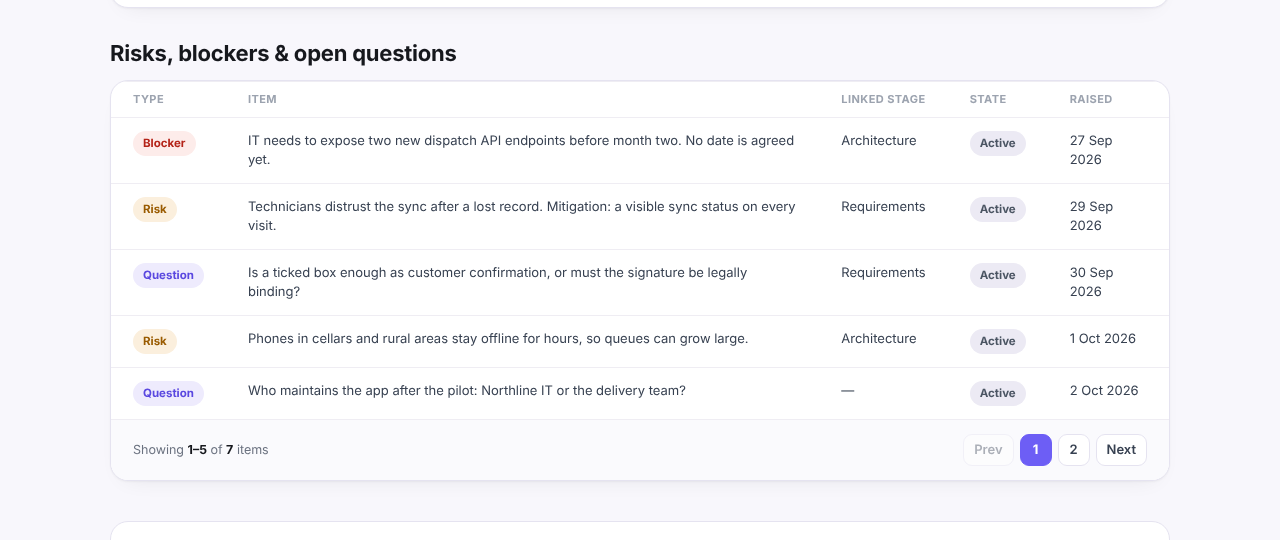
Assumptions you make to keep moving should be visible in the same place. An estimate that rests on "employees only" changes if the answer is "and 40 subcontractors". The discovery phase checklist has a section of questions that helps find these gaps.
Finally, read the requirement list back against the sources once more. Look for needs that appear in a transcript but in no requirement, and requirements with no source label at all. The second kind is often an idea someone had while writing, which may be fine, but should be agreed rather than slipped in.
Where AI helps, and what you must still check
AI is good at the slow parts of steps 2 and 3: reading a long transcript, finding the sentences that state a need, grouping similar points and proposing a first wording. It is also useful for a second read ("which statements in this transcript did my list miss?").
It needs checking in predictable places:
- Invented detail. A model may add a number, a name or a threshold that no one said. Check every figure against the source.
- Turning goals into requirements. "Reduce missed visits by 30%" is a goal. A model may rewrite it as a requirement the system cannot meet on its own.
- Lost disagreements. A summary tends to pick one version when two sources conflict. You want both, plus a question.
- Dropped constraints. Short remarks about budget, regulation or existing systems are easy to miss and expensive to discover later.
- Confident tone. A well-worded requirement reads as agreed even when it was a guess.
Discovery Phase AI is one way to do the first pass. You upload transcripts, decks, documents or images when you create a project; they are analyzed in memory and not stored, and the AI drafts stakeholders, goals, users, journeys and requirements for you to review. It is instructed to draft a requirement only when the source states it, never to invent acceptance criteria or numbers, and to leave a field empty rather than guess, and you keep or uncheck each drafted item before anything is saved. Even so, steps 1 and 4 remain yours: knowing who said what, and writing down what nobody has answered yet.
For where this work sits in the larger process, see the discovery phase in software development.