MoSCoW Prioritization: A Practical Guide With Examples
· 7 min read
MoSCoW sorts every requirement into one of four buckets: Must have, Should have, Could have and Won't have (this time). It works when the buckets mean something: Musts are few enough to deliver with confidence, each Must has a test, and the Won't list is written down. This guide covers the definitions, two rules that keep the method honest, a worked example and the usual mistakes.
The four buckets
MoSCoW comes from DSDM, an agile delivery framework now maintained by the Agile Business Consortium. The lower-case o's are only there to make the word pronounceable. The consortium's guidance defines the buckets roughly like this:
| Bucket | Meaning | The test |
|---|---|---|
| Must have | Without it the release fails: unsafe, illegal, unusable or pointless | "If this is missing, do we cancel the launch?" If yes, it is a Must |
| Should have | Important, but there is a workaround, even a painful one | "Can we go live with a manual fix or a delay?" |
| Could have | Valuable, nice to have, first to drop when time runs short | "Would anyone notice at launch if it were missing?" |
| Won't have (this time) | Agreed to be out of this release or timeframe | "Have we said out loud that we are not doing this now?" |
Two details matter more than they look:
- The buckets apply to a timeframe, usually a release or an MVP. A Won't today can be a Must in the next release.
- Should is not "Must, but softer". A Should has a workaround the business can live with for a while. If nobody can name the workaround, it is a Must.
Rules that keep Must have defensible
Left alone, almost everything drifts into Must. Two rules stop that.
Rule 1: cap the Musts
The Agile Business Consortium recommends that Must haves take no more than about 60% of the total effort, with Could haves around 20% as contingency. The cap is on effort, not on the number of items: ten small Musts can cost less than one large Should.
The reason is arithmetic. Estimates are wrong in both directions, and if 90% of the planned work is Must, there is nothing to drop when something takes longer. With 60% Must and 20% Could, the team can lose all the Coulds and still ship every Must on time.
If the Musts add up to more than the cap, you have three honest options: move some to Should, cut the scope of a Must (a simpler first version), or extend the timeframe. Pretending the cap does not apply is not one of them.
Rule 2: every Must has acceptance criteria
A Must without acceptance criteria cannot be finished, because nobody can say when it is done. Write one or more checks a tester can pass or fail:
- Weak: "Users can book appointments."
- Strong: "A patient can book a free slot for a chosen therapist in at most three steps; the slot disappears for other patients within 5 seconds; the patient receives a confirmation email."
If the room cannot agree on criteria for a Must, it is not understood well enough to be a Must yet. Record it as an open question with an owner.
A worked example
An invented project: a small physiotherapy clinic wants an online booking MVP within three months. Phone calls take up the receptionist's mornings, and missed appointments cost revenue. The table shows how the requirements might be sorted.
| Requirement | Bucket | Why | Rough effort (person-days) |
|---|---|---|---|
| Patient books a free slot with a chosen therapist | Must | The whole point of the MVP | 8 |
| Clinic staff block and unblock time in the calendar | Must | Without it, slots are wrong from day one | 4 |
| Confirmation email after booking | Must | Patients need proof; the clinic needs fewer calls | 2 |
| Patient data stored in line with health-data rules | Must | Legal requirement, not a choice | 5 |
| Reminder email 24 hours before | Should | Cuts no-shows; the receptionist can call for now | 2 |
| Patient cancels or moves a booking online | Should | Workaround: phone the clinic | 4 |
| Waiting list for fully booked days | Could | Useful, but rare at current volume | 4 |
| Patient uploads a referral letter | Could | Can be brought in on paper | 3 |
| Online payment at booking | Won't (this time) | Needs a payment provider decision first | — |
| Mobile app | Won't (this time) | A responsive website covers the need | — |
Total planned effort is 32 person-days, of which the Musts are 19, about 59%. The Coulds are 7, about 22%. That fits the guideline. If the referral upload turned out to be legally required, it would move up to Must, and something else would have to move down or the deadline would move.
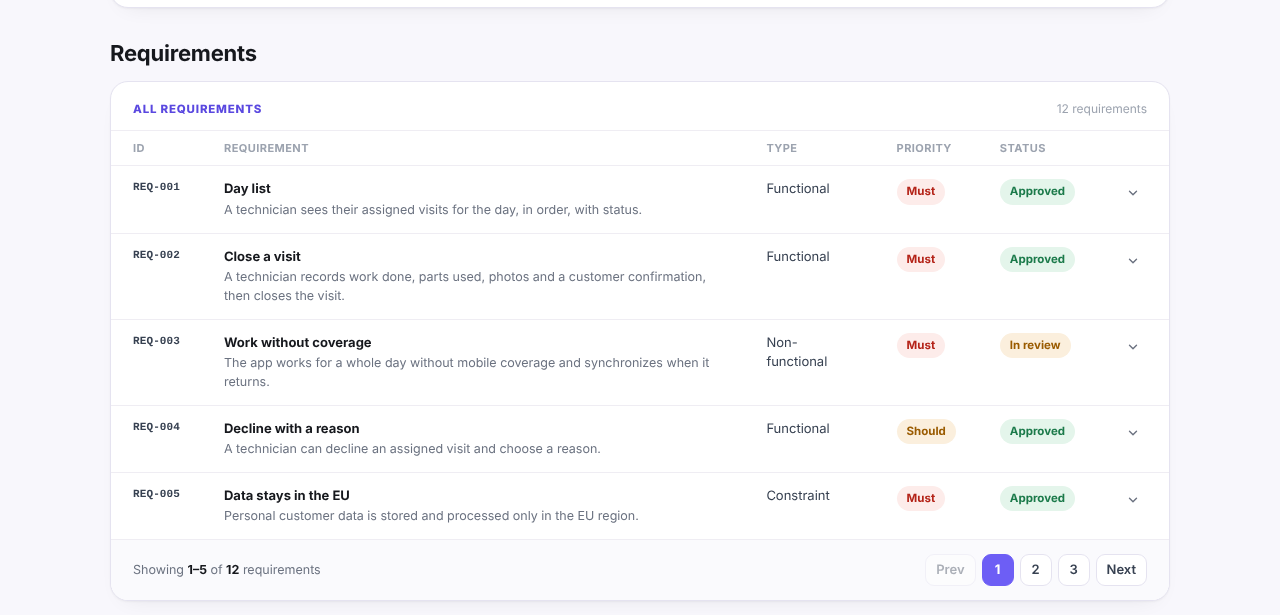
The same structure works in a real discovery document. The example report, built for an invented field-service project called Fieldwise, shows each requirement with its type, MoSCoW priority and review status:
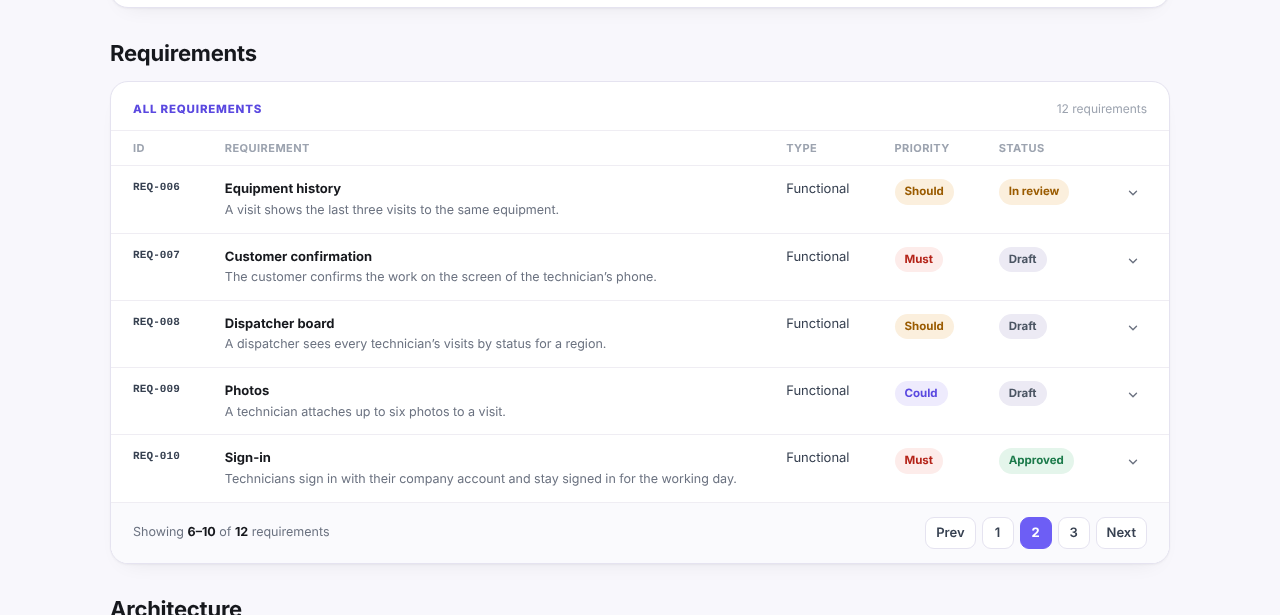
The second page holds the Should and Could items, such as equipment history and photo attachments:
How Won't have prevents scope creep
Most scope creep is not a new idea. It is an old idea nobody formally ruled out, coming back as "I thought that was included". A written Won't list closes that door:
- It records a decision, not an omission. "Online payment: Won't (this time), pending a payment provider decision" shows the topic was discussed and parked.
- It gives a polite answer. When a stakeholder asks for it mid-build, the reply is "It is on the agreed Won't list for this release; shall we raise a change request?", not a debate.
- It feeds the next release. The Won't list is the first draft of the next backlog.
- It protects the estimate. An estimate is only valid for a scope. Listing what is out shows exactly what the number does not cover.
Put the Won't items in the same list as everything else, with the same IDs, rather than in a separate document. In the Fieldwise example above, routing suggestions are marked Could with the note "deferred to a later release after the pilot". Marking it Won't would say the same thing more clearly, which is a typical small fix a review catches.
Common mistakes
- Everything is a Must. If more than about 60% of the effort is Must, the bucket has stopped meaning anything. Apply the cancel-the-launch test to each one.
- Prioritising without estimates. The cap is about effort. Sorting before you have even a rough size per item means the 60% check cannot be done.
- No Won't list. An empty Won't bucket usually means the conversation about what is out has not happened.
- Should used as a parking lot. Items nobody wants to argue about pile up in Should. Each Should needs a named workaround.
- One person sorts alone. MoSCoW is a negotiation between the people who pay, use and build. Sort with the decision maker in the room.
- Buckets set once and never revisited. Re-sort at each release, and whenever a Must turns out larger than estimated.
- Constraints treated as priorities. A regulation or a mandated platform is not a choice the team can trade off. List it as a constraint (it is effectively always in scope) and spend the MoSCoW discussion on what can actually move.
A final check before sign-off: the discovery phase checklist asks whether every Must has acceptance criteria, whether each requirement links to a goal, and whether priorities stay under about 60% Musts. If you can answer yes to all three, your MoSCoW list is ready to estimate against.