Functional Requirements Examples You Can Adapt
· 9 min read
A good functional requirement describes one behaviour of the system, says who or what triggers it, and states a result someone can test. "Users can reset their password" is a start; "a user who requests a reset receives an email with a link that works once and expires after one hour" is a requirement a developer can build and a tester can check. Below are twenty examples in weak and strong versions, grouped by feature area, that you can adapt to your own product.
All examples are invented for this article. Numbers in them (one hour, five attempts, 30 days) are placeholders: replace them with values your stakeholders have agreed.
What makes a functional requirement good
A functional requirement says what the system does. A non-functional one says how well it does it (speed, availability, security), and a constraint is a limit you cannot change (a regulation, a mandated system). This article covers the first kind.
The international requirements standard ISO/IEC/IEEE 29148 lists qualities a single requirement should have, including necessary, singular, unambiguous and verifiable. In practice, four checks catch most problems:
- One behaviour per line. If it contains "and" between two actions, it is probably two requirements.
- A clear trigger and actor. Who or what makes it happen, and when?
- An observable result. What can a tester see, measure or receive?
- No hidden solution. Describe the behaviour, not the screen layout or the database table, unless the solution itself is a constraint.
A helpful sentence pattern comes from EARS (the Easy Approach to Requirements Syntax, developed at Rolls-Royce): When [trigger], the [system] shall [response]. You do not need to use "shall" everywhere, but writing the trigger first makes gaps obvious.
Weak vs strong: side-by-side examples
Most weak requirements fail in one of a few ways: they are vague, they bundle several behaviours, or they cannot be tested. Here are five general examples before the feature areas.
| No. | Weak | Strong | What changed |
|---|---|---|---|
| 1 | The system should be user-friendly when searching. | When a user types at least three characters in the search box, the system shows matching records by title and ID within the current project. | A trigger, a scope and a visible result replace an adjective |
| 2 | Users can manage projects. | A Company Admin can archive a project; an archived project is read-only for every role and is hidden from the default project list. | "Manage" split into one behaviour with a testable outcome |
| 3 | The app supports offline mode. | A technician can record a visit without a network connection; the visit is sent to the server automatically when the connection returns. | Defines what works offline and what happens next |
| 4 | Data is exported. | A user can download the report as a PDF file containing every completed section. | Names the actor, format and content |
| 5 | Errors are handled properly. | If saving a form fails, the system keeps the entered values and shows a message naming the field or reason. | States the observable behaviour on failure |
Examples by feature area (accounts, payments, notifications, reporting)
Each table pairs a weak line with a stronger version you can adapt.
Accounts and sign-in
| No. | Weak | Strong |
|---|---|---|
| 6 | Users can sign up. | A visitor can create an account with an email address and a password; the account cannot be used until the email address is confirmed through a link sent to it. |
| 7 | Password reset is supported. | A user who requests a password reset receives an email with a link that works once and expires one hour after it was sent. |
| 8 | The system is secure against brute force. | After five failed sign-in attempts for the same account within 15 minutes, the system refuses further attempts for that account for 15 minutes and says so. |
| 9 | Admins can manage users. | A Company Admin can change a member's role between Admin and Member; the change applies on the member's next request. |
| 10 | Users can delete their account. | A user can delete their own account after re-entering their password; the system shows what will be deleted before they confirm. |
Payments and billing
| No. | Weak | Strong |
|---|---|---|
| 11 | Customers can pay online. | A customer can pay an order by card at checkout; the order is marked Paid only after the payment provider confirms the payment. |
| 12 | Refunds are possible. | A support agent can refund all or part of a paid order; the customer receives an email with the refunded amount. |
| 13 | Invoices are generated. | When a payment is confirmed, the system creates an invoice with a unique number and makes it downloadable from the customer's billing page. |
| 14 | Subscriptions renew. | When a subscription renewal payment fails, the system notifies the account owner by email and keeps the plan active for seven days before downgrading it. |
Notifications
| No. | Weak | Strong |
|---|---|---|
| 15 | Users get notified about changes. | When a visit is assigned to a technician, the technician receives a push notification with the visit time and address. |
| 16 | Users control notifications. | A user can turn each notification type (assignments, comments, reminders) on or off in their settings; the choice applies to future notifications only. |
| 17 | Reminders are sent. | The system emails the customer a reminder 24 hours before a booked appointment, unless the appointment was cancelled. |
Reporting and data
| No. | Weak | Strong |
|---|---|---|
| 18 | Managers can see reports. | A manager can view, for a chosen date range, the number of visits completed, missed and rescheduled per region. |
| 19 | Reports can be filtered. | A user can filter the requirements list by priority, status and owner; filters combine with AND, and the active filters are kept in the page address. |
| 20 | Data can be exported to Excel. | A manager can export the filtered visit list as a CSV file with one row per visit and the same columns as the on-screen table. |
Notice the pattern in the strong versions: an actor, a trigger or condition, one action, a result you can check. Where a strong version includes a number, that number is a decision someone has to make, not a detail to leave to the developer.
Adding priority and an owner
A requirement on its own is not enough to plan with. Two fields make it manageable.
Priority. MoSCoW is the most common scheme: Must (the release fails without it), Should (important but there is a workaround), Could (nice to have) and Won't (agreed not to do this time). The DSDM guidance that MoSCoW comes from recommends that Musts take no more than about 60% of the effort, so the Shoulds and Coulds leave room to absorb surprises. Agree priorities with the person who owns the budget, not alone.
Owner. One named person who answers questions about the requirement and approves changes to it. Without an owner, questions go to whoever is in the meeting.
Most teams also add a status (Draft, In review, Approved) and acceptance criteria: one to three checks that decide whether the requirement is met. For example 7 above, the criteria could be: the link opens the reset form; a second use of the link shows "This link has already been used"; a link older than one hour shows "This link has expired".
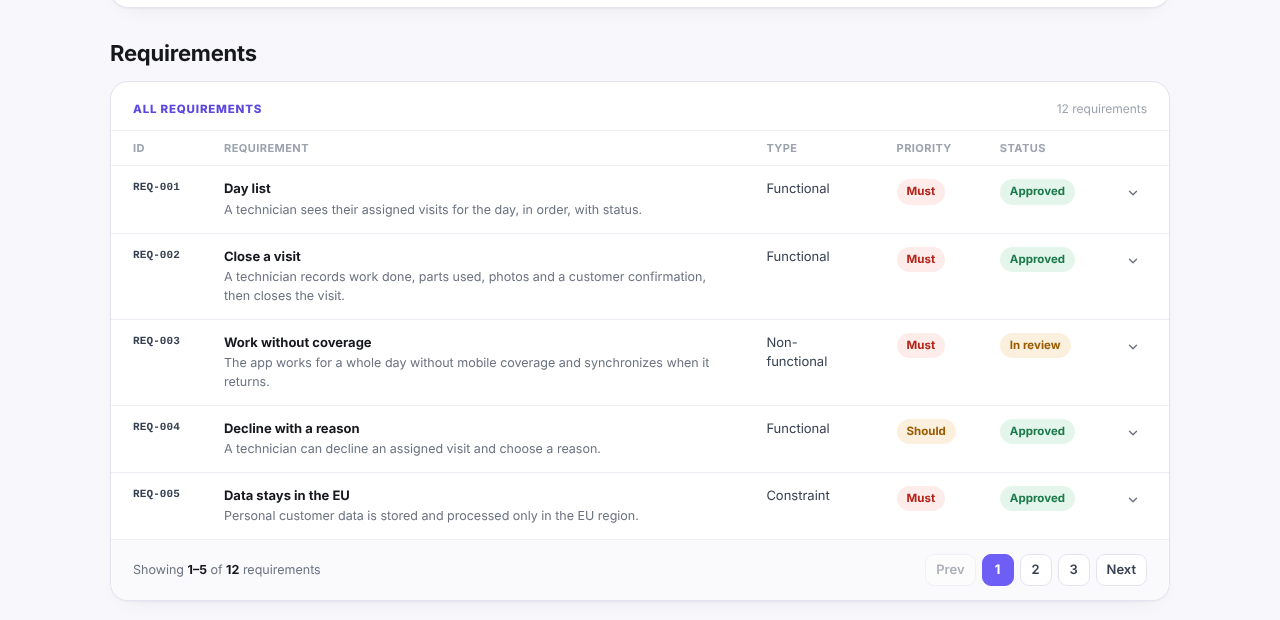
Here is how this looks in practice. The screenshot comes from the example report for Fieldwise, an invented field-service app; every name and figure is made up. Each requirement has an ID, a type, a priority and a status:
Linking each requirement to a goal
The last step is the one most often skipped. Each requirement should point to the business goal it serves, such as "reduce missed visits" or "remove double entry". The link does three jobs:
- It justifies the requirement. If a Must serves no goal, ask why it is a Must.
- It shows gaps. A goal with no requirements behind it will not be reached by the build.
- It guides trade-offs. When time runs short, requirements linked to the most important goal stay.
Not every requirement has a single goal: a constraint or a security requirement may serve the whole product. That is fine, as long as it is a conscious choice.
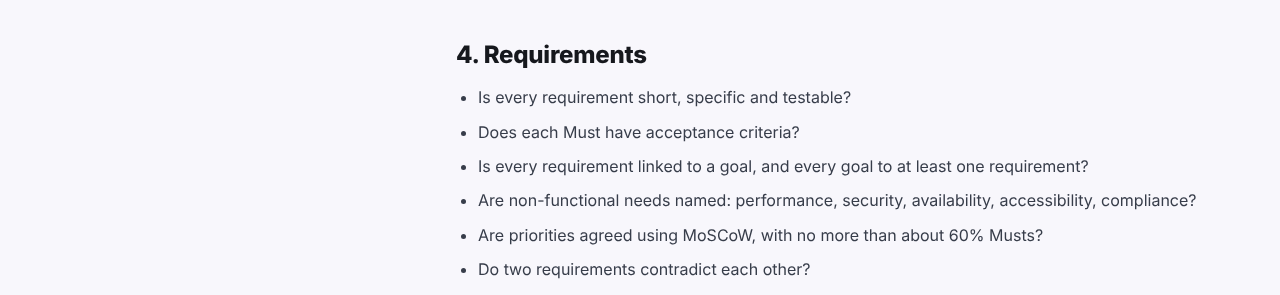
The requirements section of the discovery phase checklist turns these rules into questions you can run through before sign-off:
If you keep requirements in Discovery Phase AI, each one carries these fields (type, MoSCoW priority, status, owner, linked goal and up to 15 acceptance criteria) and gets its own AI quality score on five criteria: clear, testable, complete, consistent and traceable. The score is a prompt to look again, not a verdict; the agreement with your stakeholders is what makes a requirement right. For where requirements fit in the whole process, see the discovery phase in software development.