Turn project chaos into a build-ready plan. In days, not weeks.
Drop in the decks, docs and call transcripts you already have. Discovery Phase AI drafts all ten discovery stages, scores each one, and flags what is missing, so your team agrees on what to build before the first sprint.
- Free plan, no card needed
- 100 AI credits every month
- PDF, Word and PowerPoint export on paid plans
Your files are read in memory and never stored. How we protect your data
- Problem statementAI score 86
- Goals & success metricsAI score 91
- User experienceAI score 78
- Requirements, 24 itemsAI score 64
- Roadmap & estimationsNot started
- Source files are analyzed in memory and never stored
- Every AI suggestion is a proposal you apply
- Each company workspace is isolated
For anyone who has to define what to build before building it.
Founders and product owners
Turn a rough idea and a few documents into a plan you can show developers, partners and stakeholders.
Product and delivery teams
Align stakeholders on goals, scope and risks before the first sprint starts.
Agencies and consultancies
Run discovery for several clients in one place and hand each one a polished report.
Freelancers and solo builders
Get the structure of a full discovery without the overhead of a team process.
Most projects start with scattered notes and different ideas of "done".
One workspace for the whole discovery.
Background, goals, flows, requirements, architecture and roadmap live side by side and link to each other.
Requirements everyone can read and score.
Each requirement has priority, owner and acceptance criteria, and gets its own AI quality score.
Impact checked before it hurts.
Change one stage and the AI points out conflicts, gaps and broken links in every other stage.
From raw files to a shared plan in three steps
Upload what you have
Add decks, documents, transcripts or images when you create the project. Files are analyzed in memory and never stored.
No blank pageReview the AI drafts
Background, summary, problem, stakeholders, goals, users, journeys, flows and requirements arrive as drafts. You keep, edit or remove each item.
You stay in controlImprove, then share
Use scores and suggested changes to close the gaps. Mark stages complete and send one polished report.
Client-ready output
See every step before you sign up.
Follow one project from a kickoff-call transcript to an exported report: the AI drafts, all ten stages, the quality scores and the impact check, with screenshots of the real app.
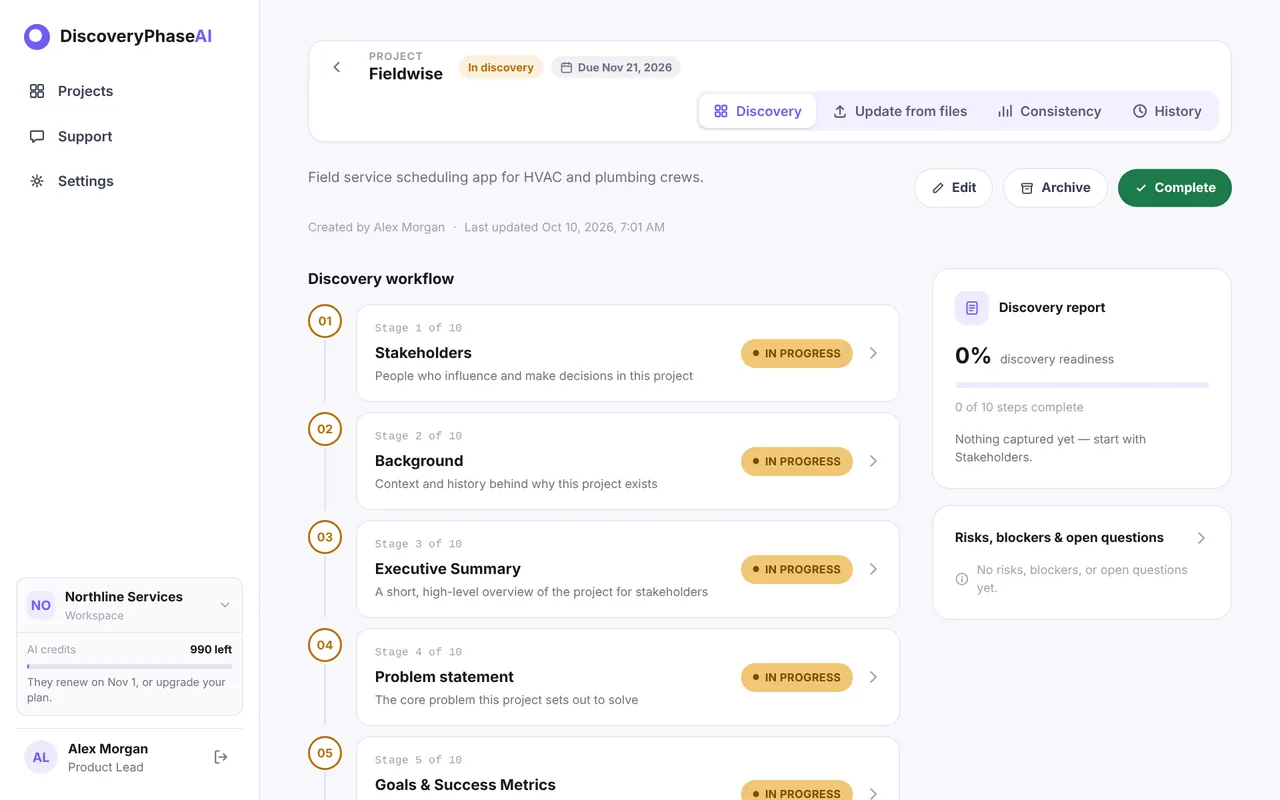
Everything discovery needs, and an AI that actually reads your project.
AI quality score on every stage
See exactly how strong each stage is, with suggestions anchored to the text that needs work. Requirements are scored one by one on five criteria.
Improve with AI, apply what you like
A chat assistant proposes concrete changes: edit text, add goals, update requirements, redraw a diagram. Nothing changes until you apply it.
Update from files
New brief or call notes mid-project? Upload them and get a reviewable list of additions, updates and removals across the whole project.
Check impact
The AI reads the entire project and reports conflicts, outdated content, gaps and broken links, then lets you fix them in one pass.
Diagrams, flows and screens built in
Architecture diagrams and user flows from Mermaid with live preview. Decision records compare options. UI screens link back to requirements.
Roadmap with honest estimates
Milestones on a timeline with person-week ranges, dependencies and assumptions. Let the AI draft the first version.
A chat window gives you text. A discovery workspace gives you a plan.
Ten stages. Nothing forgotten.
Every project follows the same proven sequence, so a new teammate always knows where things stand.
- 01StakeholdersWho decides and who is affected.
- 02BackgroundWhy this project exists.
- 03Executive summaryA short overview anyone can read.
- 04Problem statementThe core problem to solve.
- 05Goals & success metricsGoals, targets and KPIs.
- 06User experienceUsers, journeys and flows.
- 07RequirementsWhat to build, with priority.
- 08ArchitectureDiagrams and decisions.
- 09UI screensWireframes tied to requirements.
- 10Roadmap & estimationsMilestones and effort.
One report your client, CEO and developers can all sign off.
Completed stages compose into a single discovery report, with requirements, architecture decisions, diagrams and roadmap. Download it in the format your audience already uses.
- Word
- PowerPoint
- Markdown
Collaborate without overwriting each other. Keep every project and client apart.
Safe simultaneous editing
If two people edit the same record, nobody is silently overwritten. You see a conflict and choose.
History you can trust
Every change is journaled, with AI and file-update changes labeled. Pro adds stage versions you can restore.
Roles that fit your team
Company admins and members, with project writers and read-only viewers. Invite people by email on Team plans.
Many clients, one account
Agencies can cover any number of client companies with one subscription, each with its own isolated workspace.
Questions, answered
Do I need to write everything from scratch?
No. Upload the files you already have and the AI drafts the stages for you to review. You can also start from an empty project.
Is it really free to start?
Yes. The Free plan needs no card and includes three active projects, one file of up to 10 MB per upload and 100 AI credits every month, with Markdown export. PDF, Word and PowerPoint export come with paid plans; see Pricing.
Are my uploaded files stored?
No. Source files are analyzed in memory to produce drafts and are never saved to disk or a database.
Do you train AI models on my data?
No. We do not train models on your files or project content. Your text is sent to the AI provider only to produce the drafts and suggestions you ask for, and the provider does not use it to train its models.
Will the AI change my content without asking?
No. Every AI suggestion is a proposal. You review and apply each one, and every change is recorded in the history.
How is this different from asking a general AI chat?
A chat answers one prompt at a time. Discovery Phase AI keeps all ten stages in one project, checks them against each other, lets you apply each suggestion record by record, keeps history and builds the final report.
What happens when I run out of AI credits?
Credits renew every month. Your content stays fully editable, and you can upgrade at any time.
Can I share the result with a client who has no account?
Yes. Download the report as Markdown, or as PDF, Word or PowerPoint on a paid plan, and send it to anyone.
Your next project deserves a plan everyone agrees on.
Create a free workspace, upload your first files, and see a drafted discovery in minutes.
Start free discovery