Acceptance Criteria Examples for Testable Requirements
· 7 min read
Acceptance criteria are the short, checkable statements that decide whether a requirement is done. Write them as lines that are either true or false, from the point of view of the user or the system, and keep one check per line. There are three common formats: a plain checklist, Given/When/Then scenarios and a rule list. Below are examples of each, and how to choose.
What acceptance criteria are for
A requirement says what the software must do. Acceptance criteria say how someone will check that it does. Without them, "done" becomes a negotiation at the end of the work: the developer thinks a feature is finished, the client expected something else, and both are reasonable.
Three people use the criteria:
- The client or sponsor reads them to confirm that this is what they asked for.
- The developer builds to them, so there are fewer questions during the work.
- The tester turns each line into a check, which is why every line has to be something you can observe.
The criteria also make the estimate more honest. A requirement such as "users can export reports" can mean an afternoon or a month. Three criteria that name the formats, the size limit and the time it may take show which one you are pricing. If you are still deciding what belongs in the requirement itself, start with functional requirements examples.
Three formats compared
| Format | What it looks like | Best for | Weak spot |
|---|---|---|---|
| Checklist | A short list of true-or-false statements | Most requirements; reviews with non-technical people | Can hide an order of steps or a failure path |
| Given/When/Then | A scenario with a starting state, an action and a result | Behaviour that depends on state, rules with exceptions, anything a tester will automate | Long when overused; easy to write vague steps |
| Rule list | "Always", "never" and "only when" statements | Business rules, permissions, limits | Does not show the sequence of what happens |
You can mix formats in one project. Pick per requirement, not per document.
The same requirement in all three formats
The examples use Fieldwise, an invented field-service app for technicians. The requirement is "A technician records work done, parts used, photos and a customer confirmation, then closes the visit."
As a checklist
- A closed visit appears in the dispatch system with every field filled.
- Closing takes under two minutes in the pilot test.
- A visit cannot be closed without a customer confirmation.
As Given/When/Then
Scenario: Technician closes a visit with a confirmation
  Given a visit with status "In progress"
  And the technician has added work done and one photo
  When the technician records the customer's confirmation and closes the visit
  Then the visit status becomes "Closed"
  And the closed visit is sent to the dispatch system

Scenario: Closing without a confirmation
  Given a visit with status "In progress"
  When the technician tries to close the visit without a customer confirmation
  Then the visit stays "In progress"
  And the app shows which field is missing
The keywords come from Gherkin, the language used by Cucumber. Its reference describes Given steps as setting the initial context of the system, When steps as an event or an action, and Then steps as an expected outcome (Gherkin reference). Keep the outcome observable from outside: what the user sees or receives, not which table was updated.
As a rule list
- A visit can be closed only by the technician it is assigned to.
- A visit is closed only when work done and a customer confirmation are both present.
- A closed visit is never edited by the technician; a correction is a new entry.
For this requirement the checklist is the quickest to read, the scenarios are the clearest for the failure case, and the rules are the cleanest for permissions. A practical routine is to write the checklist first and expand only the lines that cause arguments.
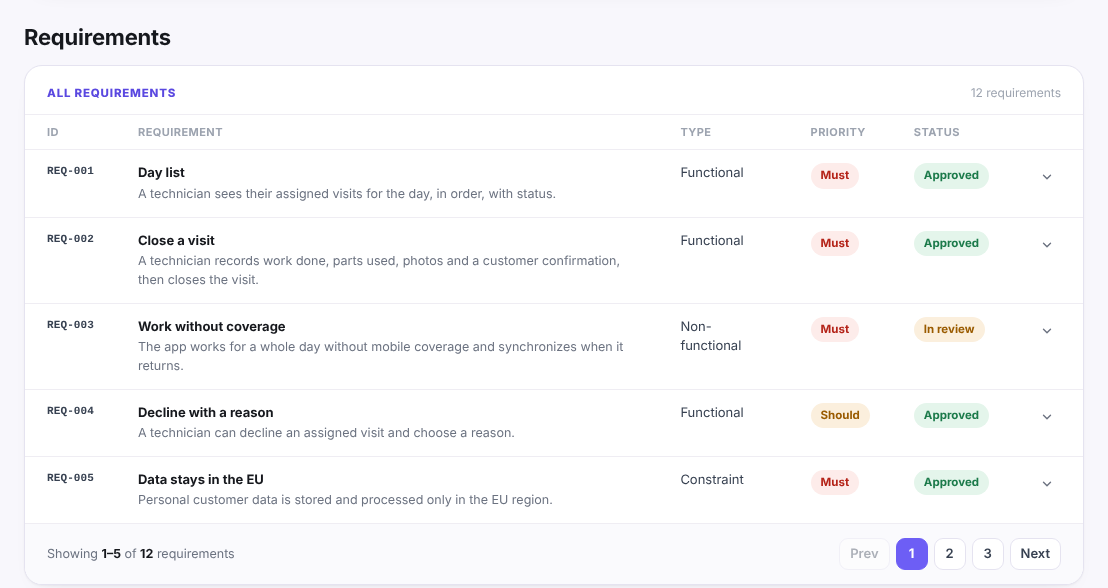
Here is how requirements look as records when the criteria are kept with them. The project is invented, and each record has an ID, a type, a priority and a status:
Examples by requirement type
Acceptance criteria are not only for functional requirements. Each type needs a different kind of check.
Functional: password reset
- A user who requests a reset receives an email with a link.
- The link works once and expires after one hour.
- Using an expired link shows a message and offers to send a new one.
Non-functional: speed
- The day list opens in under two seconds on the test phone, on a connection of at least 4 Mbit/s, with 40 visits loaded.
- Every figure names the condition it was measured under; a number without conditions cannot be checked.
Non-functional: availability offline
- A technician can open the day list, view a visit and close it with no network.
- Closed visits are sent automatically when coverage returns.
- A visit that could not be sent shows a visible "waiting to send" status.
Constraint: data location
- Personal customer data is stored and processed only in the EU region.
- The list of services that receive customer data is documented and approved by the client before release.
For the non-functional side, non-functional requirements examples has more patterns with numbers and conditions.
Common mistakes
- Vague words. "Fast", "easy", "intuitive" and "secure" cannot be checked. Replace them with a number, a condition or a named behaviour.
- Several checks in one line. If a line contains "and" between two actions, a tester cannot say whether half of it passed. Split it.
- Solution instead of result. "The data is saved in the visits table" is a design choice. "A closed visit is still there after the app restarts" is a result.
- Only the happy path. Add the failure that is most likely: the missing field, the lost connection, the expired link.
- Criteria nobody owns. Each Must requirement needs its criteria agreed by the person who can accept the work, not only written by the person who will build it.
- Too many scenarios. As a rule of thumb, three to six criteria per requirement is enough. If you need twenty, the requirement is probably several requirements.
Review checklist
Before the requirements go to sign-off, check each Must and Should:
- Does it have at least one acceptance criterion, and is each line true or false?
- Can a tester run each line without asking the author what it means?
- Does every number state its unit and the conditions it was measured under?
- Is there at least one failure case for requirements that involve input, money, permissions or a network?
- Is the criterion about what happens, not how it is built?
- Has the person who accepts the work read and agreed it?
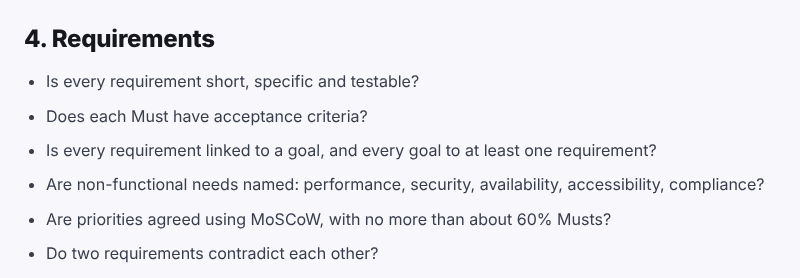
The discovery phase checklist asks the first of these questions about requirements. It is part of a longer list of questions to answer before a discovery is signed off:
You can use the full discovery phase checklist as a starting point, and the software requirements document template shows where acceptance criteria sit among the other sections of a requirements document. If a priority question comes up while you write them, the MoSCoW prioritization guide explains how to sort Musts from Shoulds.