Non-Functional Requirements Examples for Software Projects
· 8 min read
A non-functional requirement (NFR) says how well a system must do its job: how fast, how available, how secure, how accessible, how long it keeps data. A good one has a number and a way to test it, such as "search results appear within 1 second for 95% of requests". Below are measurable examples by category, the question that gets each one out of a client, and how NFRs change the estimate.
Why NFRs get missed
Functional requirements are easy to collect because people describe what they do: "I need to approve an invoice." Nobody walks into a workshop and says "I need the approval page to respond within 800 milliseconds at the 95th percentile." Quality expectations stay unspoken until they are broken.
Three patterns cause most of the misses:
- They are assumed. The client thinks "obviously it is secure and always up". The team thinks "normal hosting, normal security". Both are right in their own heads and wrong about each other.
- They are vague. "Fast", "scalable" and "user-friendly" are written down, but nobody can test them, so they do not shape the design or the price.
- Nobody owns them. A feature has a user who asks for it. Availability or data retention belongs to operations, legal or IT, who are often not in the discovery sessions.
The ISO/IEC 25010 quality model (2023 edition) splits product quality into nine characteristics, including performance efficiency, compatibility, reliability and security. You do not need the full model, but it is a useful list to check against so that a whole category is not skipped.
Categories and measurable examples
Each example below has a number, a condition and something a tester can measure. Treat the figures as illustrations; the right values come from the client's needs and budget.
| Category | Measurable example | How it is tested |
|---|---|---|
| Performance (response time) | The order search returns results within 1 s for 95% of requests, with 200 users active at once | Load test at the stated concurrency |
| Performance (web pages) | Public pages reach a Largest Contentful Paint of 2.5 s or less for 75% of visits | Field data from real users |
| Capacity | The system handles 50,000 orders a month and 3 years of history without the search target above being missed | Load test on a seeded database |
| Availability | The customer portal is available 99.9% of each calendar month, excluding announced maintenance | Uptime monitoring |
| Recovery | After an outage, service is restored within 4 hours (RTO) with no more than 15 minutes of data lost (RPO) | Restore drill from backups |
| Security (access) | Every page except sign-in requires an authenticated session; staff accounts use multi-factor sign-in | Access test per role |
| Security (verification) | The application meets the OWASP ASVS Level 2 requirements before go-live | Security review against the checklist |
| Accessibility | Public and customer pages meet WCAG 2.2 Level AA | Audit with assistive technology |
| Data retention | Support messages are deleted 24 months after the last reply; audit logs are kept 7 years | Scheduled job and a test record |
| Privacy (location) | Personal data is stored and processed only in the EU | Hosting and vendor review |
| Compatibility | The staff app works on the latest two versions of the main desktop browsers | Browser test matrix |
| Maintainability | A new team member can run the system locally from the written setup guide in under one day | Onboarding trial |
A few sources for the numbers:
- The 2.5-second LCP figure is Google's "good" threshold for Core Web Vitals, measured at the 75th percentile of page loads.
- OWASP ASVS is a free, public checklist of security requirements in three levels; naming a level turns "secure" into something testable.
- WCAG 2.2 is the W3C accessibility standard; Level AA is the level most commonly asked for.
- Availability percentages translate into allowed downtime. Over a 30-day month, 99.9% allows about 43 minutes of downtime, 99.95% about 22 minutes and 99.99% about 4 minutes.
Retention periods are the client's decision, often driven by law or a contract. Under the GDPR, personal data should be kept no longer than necessary (Article 5(1)(e)), so a retention NFR usually needs a specific period per type of data, not "forever".
Questions to ask the client
Clients rarely answer "what is your availability target?" with a number. Ask about consequences instead, and turn the answer into a figure yourself:
- Performance: "Which screen do people use most, and what happens if it takes five seconds?" "How many people use it at the busiest hour of the busiest day?"
- Availability: "If the system were down for an hour on a Tuesday morning, what would it cost you? And at 2 a.m. on a Sunday?"
- Recovery: "If we lost the last hour of data, could you re-enter it? The last day?"
- Security: "Who must never see this data? Has anyone asked you for a security questionnaire or penetration test?"
- Accessibility: "Is this used by the public or by employees? Are you bound by an accessibility law or a buyer's policy?"
- Data retention: "How long do you have to keep records, and is there anything you must delete after a while?"
- Location and vendors: "Do your contracts or regulators say where data may be stored?"
- Growth: "How many users or records do you expect in a year? In three?"
When the answer is "I don't know", write the NFR with a proposed value and mark it for confirmation. A proposed number that someone corrects is far more useful than a blank.
Where NFRs go in the document
Put NFRs in the same requirements list as functional ones, not in an appendix at the back. Give each one:
- An ID and a short title, like any other requirement
- The type non-functional, so it can be filtered
- A priority (Must, Should, Could, Won't)
- One or more acceptance criteria with the number and the test
- The goal or constraint it serves, where there is one
In the example report for Fieldwise, an invented field-service project, "Work without coverage" is a non-functional Must sitting in the same list as the functional requirements, and "Data stays in the EU" is a constraint:
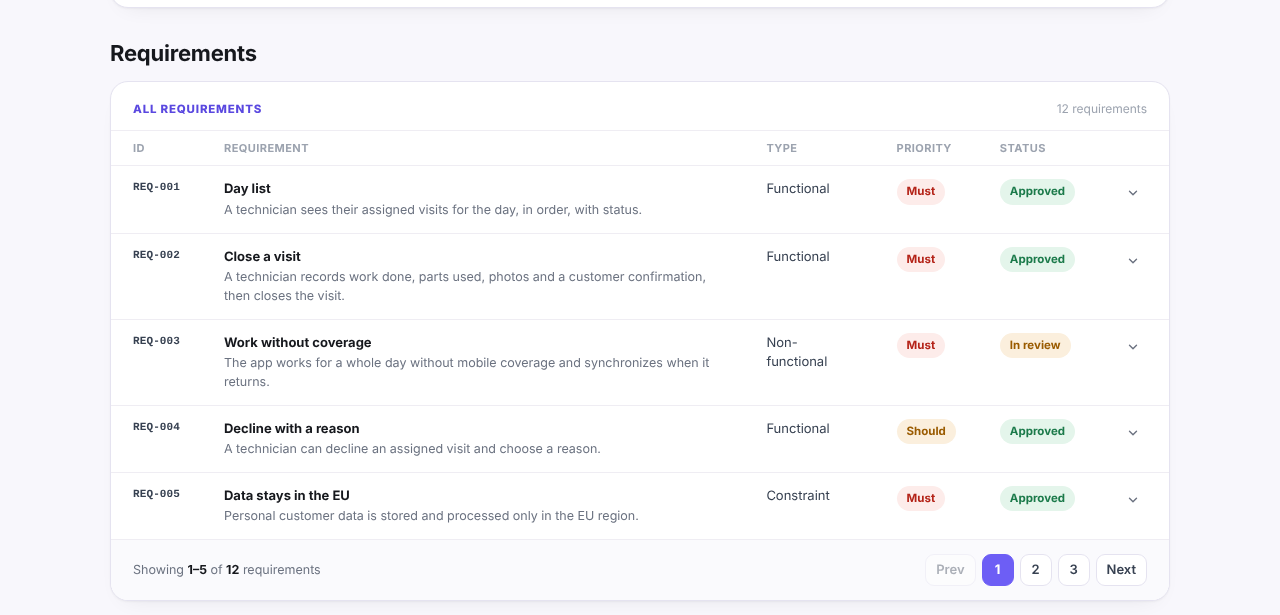
Keep constraints separate from NFRs. A constraint is a limit the team cannot change: a mandated cloud provider, a regulation, a fixed budget or deadline. An NFR is a quality target the team designs for. Mixing the two hides which items are negotiable.
The discovery phase template uses exactly this split (functional, non-functional, constraint), and the discovery phase checklist asks whether performance, security, availability, accessibility and compliance needs are named:
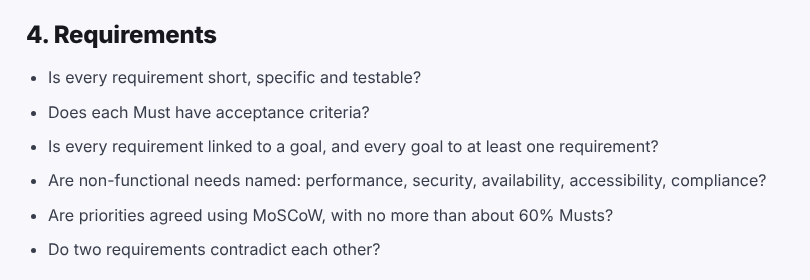
In Discovery Phase AI, a requirement carries one of these three types, and its AI score rates whether it is clear and testable, which tends to flag an NFR that has no number.
How NFRs change the estimate
NFRs often move the estimate more than an extra feature does, because they apply to everything. Rules of thumb, not measured figures:
- Each extra "nine" of availability costs more than the last. Going from 99.9% to 99.99% usually means redundant infrastructure across zones, automated failover and someone on call, which changes both build and running costs.
- Tight recovery targets need tested backups and drills, not just a backup setting.
- A named security level adds work everywhere: input validation, logging, session handling, reviews. Asking for ASVS Level 2 late in a project means rework.
- Accessibility is cheap when designed in and expensive when retrofitted. Agree the level before screens are designed.
- Data volume and retention shape the database design, archiving and search. Three years of history is a different system from three months.
- Location rules limit vendor choice, which can rule out a service the estimate assumed.
That is why NFRs belong in discovery and not in the first sprint. List them with numbers, mark the ones still to confirm, and state in the estimate which NFR values it assumes. If a client later raises a target, the change and its cost are then visible instead of being an argument.