Wireframes in Discovery: How Detailed Should They Be?
· 6 min read
In discovery, a wireframe should be rough enough to change in minutes and specific enough that two people read it the same way. Show what is on each screen, what the person can do, and which requirement the screen serves. Leave colour, typography and polish to design. Below is how to pick the level of detail, how to link screens to requirements and what to hand over.
What wireframes are for in discovery
A discovery wireframe is not a design. It is a way to check understanding. Words like "the technician sees the visit details" mean different things to different readers, and a rough screen makes the difference visible in one look: is the phone number on it, is the history there, where is the button to decline?
In discovery they do four jobs:
- They test the requirements. Drawing a screen for a requirement shows what is missing: a field nobody mentioned, an action with no place to go.
- They help the client see the product. People who cannot picture software from a list can react to a sketch.
- They support the estimate. The number of screens and how complex each is, are an input. A screen with a map, a form and an offline state is a different size from a list page.
- They give the design team a starting point. Not a finished look, but the content and actions that must be there.
They do not decide the visual style, and they are not a promise of exactly how the screen will look. Say that at the first review, or the client will give feedback on the colour of a button that does not exist yet.
The right fidelity
Choose the lowest fidelity that still answers the question. A useful way to think about it is three levels:
| Level | What it shows | Use it when |
|---|---|---|
| Sketch | Boxes and labels on paper or a whiteboard | Exploring several ideas with the team |
| Wireframe | Real labels and real content, rough layout, no styling | Reviewing with the client in discovery |
| Mock-up | Colours, fonts, spacing and final text | Design work, after discovery |
For discovery, the middle level is usually right. A few rules make it work:
- Use real content. "Mrs Ellis, 4 Harbour Road" tells you more than "Lorem ipsum". Real content also exposes long names, empty values and missing data.
- Show the important states. For each screen, ask what it looks like when it is empty, loading, in error and, if relevant, offline. These states are what usually get skipped, and they carry requirements.
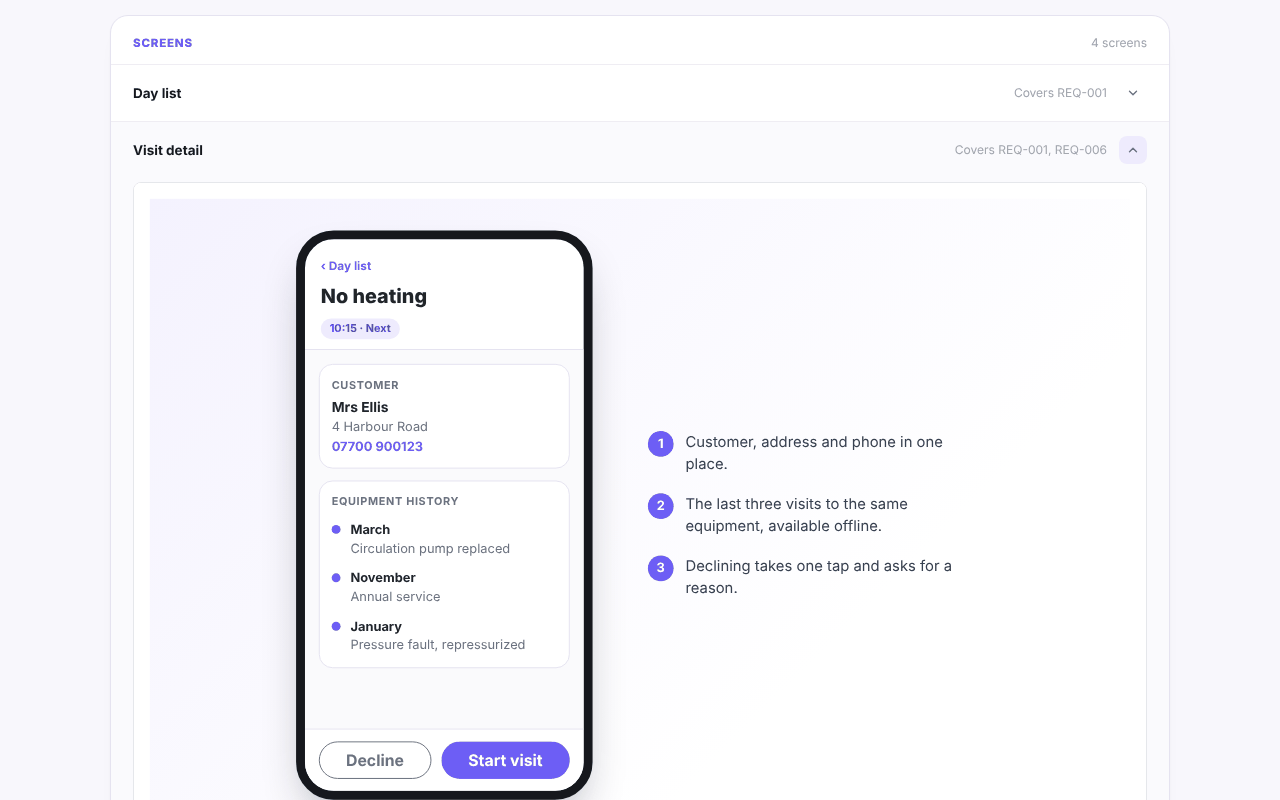
- Number the notes. A short numbered explanation next to the screen ("declining takes one tap and asks for a reason") turns a picture into something testable.
- Cover the first release only. Draw the screens for the work in the "in" list, not every screen the product might ever have. A rule of thumb is the key screens of each main journey, which is usually somewhere between 5 and 15. If it comes to 40, the scope or the detail is too big for discovery.
- Do not spend time on alignment and polish. If a drawing takes more than half an hour, it is probably too detailed.
Link every screen to a requirement
A screen with no requirement behind it is a feature nobody asked for, and a requirement with no screen may be forgotten. Make the link explicit, in both directions:
- Each screen names the requirements it covers, by ID.
- Each requirement that involves what a person sees points to a screen, or says that none is needed.
In the example report of an invented project, Fieldwise, the screens are listed with the requirements each one covers. The Day list covers REQ-001; Visit detail covers REQ-001 and REQ-006; Close visit covers REQ-002 and REQ-007; the Dispatcher board covers REQ-004 and REQ-008:
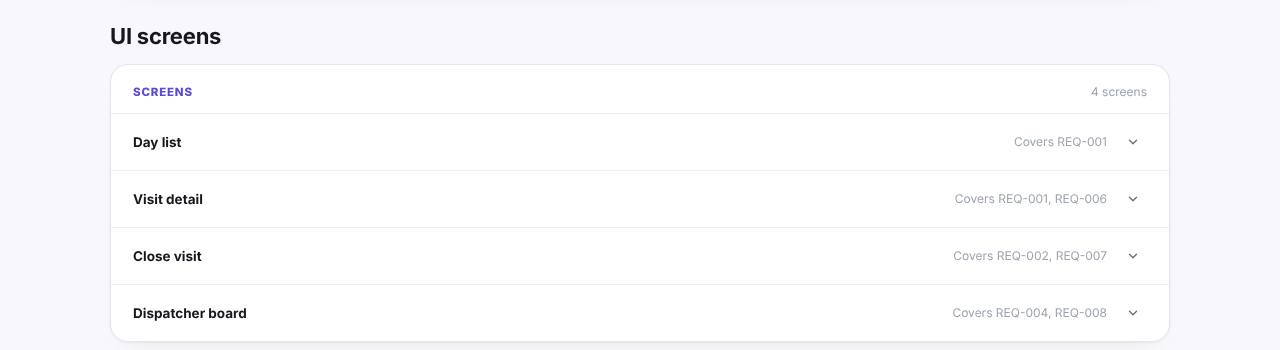
When you check the list, you find gaps from both sides. A requirement that no screen covers is a question: where does the user do this? A screen that covers nothing is another: why is it there? The functional requirements examples article shows how to write requirements specific enough to draw.
Review with the client
A wireframe review is short and structured, so it does not drift into taste:
- Say what you are reviewing. Content and actions, not style.
- Walk through a journey, not a list of screens. "A technician opens the day list, taps a visit, reads the history, starts the visit." Following the path finds missing steps.
- Ask the right questions. Is anything missing from this screen? Is anything here that nobody needs? What happens if this is empty, or fails?
- Write down every change with the requirement it touches. A change to a screen is often a change to a requirement, and it may change the estimate.
- Get the decision maker's agreement that the screens cover the first release. Silence is not agreement; ask for it by name.
If the client keeps suggesting visual changes, note them for the design phase and move on. They are valid, but they are not discovery questions.
What to hand to designers
The designers should receive more than the pictures. A useful handover contains:
- The wireframes with numbered notes, as agreed with the client.
- The requirements each screen covers, with their acceptance criteria.
- The states: empty, loading, error and offline, not just the normal view.
- The real content: examples of names, lengths and edge cases.
- The open questions about the screens, with who answers them.
- The constraints that affect design, such as accessibility needs, supported devices or a brand guide.
Tell them clearly what is fixed (the content and the actions, because the client agreed them) and what is free (layout, visual style, micro-interactions), so they do not feel boxed in or, worse, copy the rough layout as if it were final.
Here is one invented example, the Visit detail screen of the Fieldwise app, as it appears in the example report. It is a wireframe, not a design: a phone frame, three numbered notes and the two actions that matter, Decline and Start visit:
Wireframes are one of the deliverables of a discovery phase. The full list, and what each should contain, is in discovery phase deliverables. Screens also affect the plan, because each complex screen is a piece of effort in a milestone: see the software project roadmap template. You can open the example report to see how screens, requirements and the rest of a discovery fit together.