Discovery Phase Deliverables: What You Should Receive
· 8 min read
A software discovery phase should end with ten concrete deliverables: a stakeholder map, background, an executive summary, a problem statement, goals with success metrics, users with journeys and flows, prioritized requirements with acceptance criteria, architecture diagrams and decisions, rough UI screens, and a roadmap with estimates, assumptions and risks. If a proposal promises only "a discovery document" or "a specification", ask which of these it includes and how each will be judged.
This list works both ways. A client can use it to check an agency's proposal, and an agency can use it to say precisely what it will hand over. For the process that produces them, see the discovery phase in software development.
The ten deliverables at a glance
| No. | Deliverable | What it answers | Done when |
|---|---|---|---|
| 1 | Stakeholders | Who decides, who is affected, who can say no | You know who signs off |
| 2 | Background | Why the project exists, what was tried before | A new team member understands the context |
| 3 | Executive summary | The problem, the proposal, the cost range, the decision needed | A sponsor can read it in two minutes |
| 4 | Problem statement | Who has which problem, how often, at what cost | It names no solution and cites evidence |
| 5 | Goals and success metrics | What changes, measured how, by when | Every goal has a number, a baseline and a date |
| 6 | Users, journeys and flows | Who uses the product and what they do | The main journey of each user is mapped |
| 7 | Requirements | What the product must do | Every Must has acceptance criteria and a goal |
| 8 | Architecture and decisions | How it fits together and why | Integrations are known and key choices recorded |
| 9 | UI screens | What the key screens contain | Each screen is tied to the requirements it covers |
| 10 | Roadmap, estimates and risks | When, how much effort, what could go wrong | Estimates are ranges with stated assumptions |
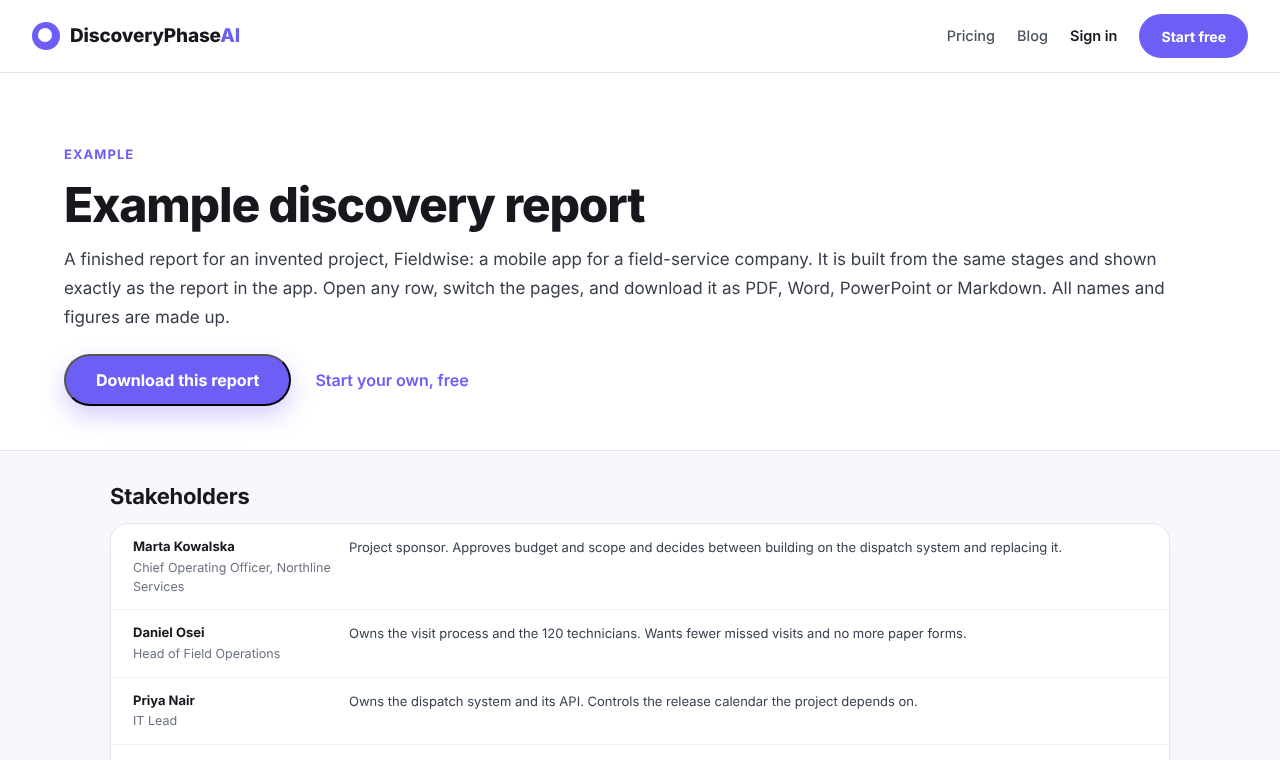
The discovery phase template describes each section in more detail. The screenshot below shows the start of a finished report for Fieldwise, an invented field-service app used in our example report; all names and figures in it are made up.
The deliverables do not need to be ten separate files. One document with these sections is easier to read and keep current. What matters is that each section exists and meets its "done when" test.
Problem, goals and success metrics
These are the deliverables a sponsor reads first, and the ones most often left vague.
Problem statement. A useful one says who is affected, what goes wrong, how often and what it costs, without describing the solution. "Dispatchers learn about declined visits by phone, often hours late, so about one visit in ten is missed" (an invented example) is a problem statement. "We need a mobile app" is not. Ask what evidence supports it: data, support tickets, interview quotes.
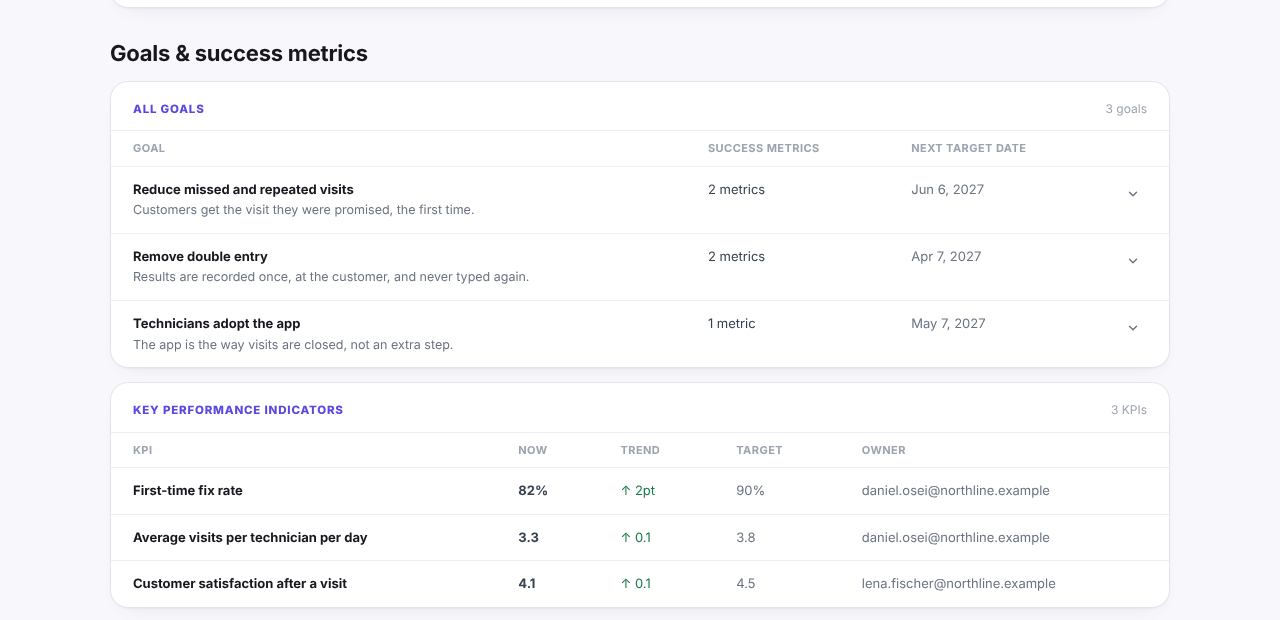
Goals and success metrics. Two or three goals is usually enough. Each needs a metric with today's value, a target and a date. Without a baseline you cannot tell later whether the project worked. Key performance indicators (KPIs) are the figures someone keeps watching after launch, with a named owner.
How to judge them:
- Can you tell, from the goal alone, how it will be measured?
- Is the baseline real (measured) or estimated? If estimated, is that stated?
- Do the stakeholders agree which goal matters most?
Users, journeys and flows
This deliverable shows who uses the product and how. It typically has three parts:
- Users and actors, each with goals and pain points. "Technician" and "dispatcher" are actors; so is an external system that sends data.
- Journeys: the steps a user takes to reach a goal, including where they get stuck today.
- Flows: key processes drawn as diagrams, so edge cases (a declined visit, a lost connection) are visible.
How to judge them: pick the most important user and follow their journey step by step. Every step should either be supported by a requirement or be explicitly out of scope. Ask whether unusual cases are covered: first use, errors, permissions, empty states.
Requirements with priorities and acceptance criteria
The requirements list is usually the longest deliverable and the one developers use most. Each requirement should have:
- an ID, a short title and a one-sentence description;
- a type: functional (behaviour), non-functional (quality such as performance or availability) or constraint (a limit you cannot change, such as a regulation or a mandated system);
- a priority, commonly MoSCoW (Must, Should, Could, Won't);
- acceptance criteria that a tester could pass or fail;
- the goal it supports, and an owner.
How to judge it:
- Testability. "The app is fast" fails; "the day list loads in under two seconds on a 4G connection" passes.
- Priorities. If nearly everything is a Must, nothing has been prioritized. The DSDM guidance behind MoSCoW suggests Musts take no more than about 60% of the effort.
- Traceability. Every Must should trace to a goal, the problem statement or a stakeholder need.
- Non-functional needs. Security, availability, accessibility and data residency are often missing and expensive to add later.
Architecture decisions, roadmap, estimate and risks
Architecture. At discovery stage this is a first technical picture, not a full design. Expect a context diagram (the system and the systems around it), a component view, a list of integrations with their owners, and decision records. A decision record states the question, the options compared, the choice and its consequences; the format popularized by Michael Nygard is a common starting point.
UI screens. Rough wireframes of the three to five screens users meet most. They exist to agree on content and flow, not visual design. Each should name the requirements it covers.
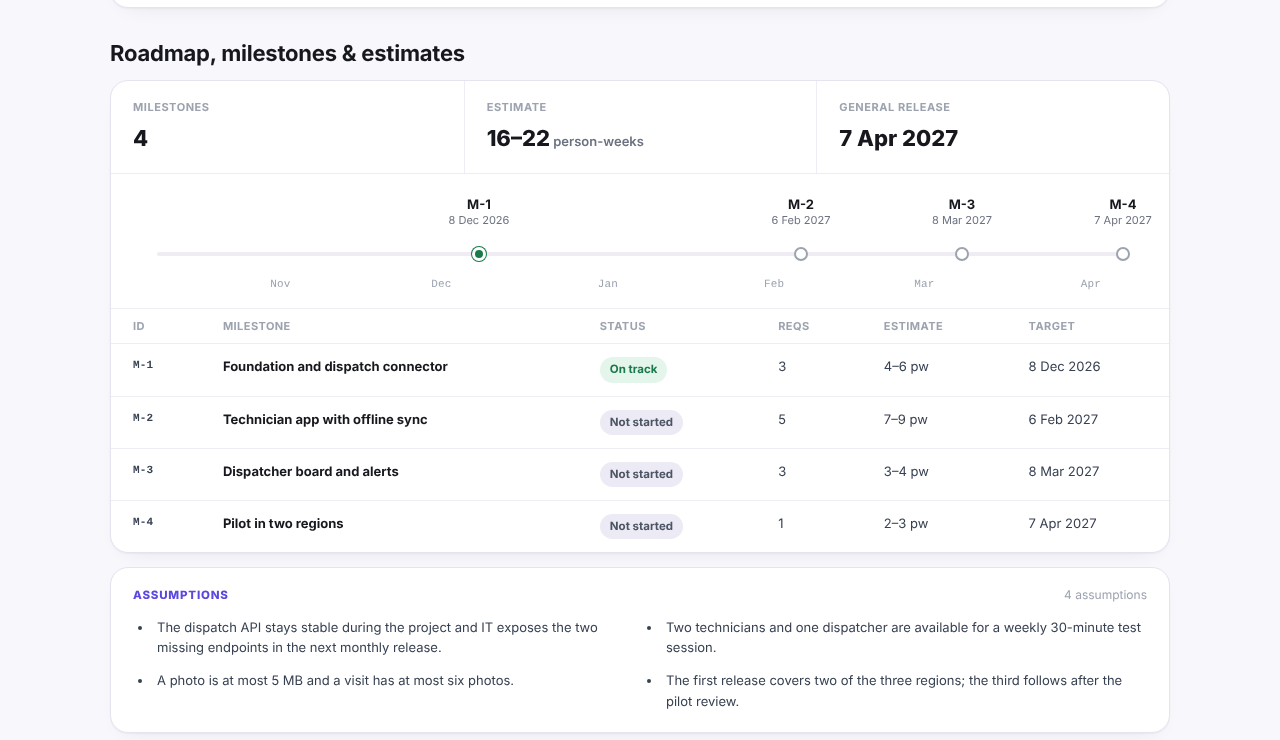
Roadmap and estimate. Milestones that each end with something visible, with dependencies between them and an effort range per milestone. A single number is a warning sign: early estimates carry wide uncertainty, as Construx's write-up of the cone of uncertainty explains. The assumptions behind the range should be written next to it.
Risks, blockers and open questions. Each item needs an owner and a next step. Open questions are a deliverable in their own right: a discovery that ends with none listed has probably not looked hard enough.
Red flags in a discovery proposal
When you review a proposal, these are worth a question before you sign:
- "A discovery document" with no list of contents. Ask for the sections and what "done" means for each.
- No goals or metrics. Without them, nobody can judge whether the build succeeded.
- Requirements without acceptance criteria or priorities. This usually means the hard conversations have been postponed to development.
- A single-number estimate. Ask for a range and its assumptions.
- No user research. If no one will speak to the people who use the product, journeys and requirements will be guesses.
- No architecture or integrations section for a product that connects to existing systems.
- No risks or open questions. Every real project has them.
- The output is slides only. Slides are good for a sign-off meeting, but developers need something they can search and reference.
- No sign-off step. It should be clear who approves the result and what happens next: build, a smaller pilot or stop.
The discovery phase checklist turns these into questions you can ask at the end of a discovery.
If you produce discoveries yourself, Discovery Phase AI organizes a project into these ten stages and composes the completed ones into one report, exported as Markdown, or as PDF, Word or PowerPoint on paid plans. Whatever tool you use, the test is the same: each deliverable exists, someone has checked it against its "done when" line, and the sponsor has read the summary.