AI Requirements Gathering Tools and How to Choose One
· 7 min read
AI requirements gathering tools fall into four groups: general chat assistants, requirements-management suites with AI features, PRD generators, and tools built for the whole discovery phase. Choose by the job, not by the label. If you write one document alone, a chat assistant may be enough. If requirements, decisions and estimates must stay consistent across weeks and people, you need structure. This guide covers the four categories, what to evaluate, the privacy questions to ask and a short checklist. No individual product is compared.
This article is written by the team behind Discovery Phase AI, which belongs to one of the categories below. Read the criteria as a checklist you can apply to any tool, ours included.
Four categories of tool
| Category | What it does | Strongest at | Typical limit |
|---|---|---|---|
| General chat assistants | Answer prompts about any text you give them | First drafts, rewording, brainstorming edge cases | No built-in structure; consistency is your job |
| Requirements-management suites with AI features | Store requirements as controlled records, often with approvals, baselines and traceability | Large, regulated or long-lived programmes | Setup effort; AI features may be add-ons to a heavy process |
| PRD and spec generators | Produce a product document from a short description or a form | Speed on a small, new product | Output depends on a thin input; fewer links to sources |
| Discovery tools | Take your source files and draft the stages of a discovery, with review and a final report | Turning decks, documents and transcripts into a connected first draft | Narrower than a full management suite; less suited to formal change control |
Most real projects use more than one. A common pattern is a chat assistant for open-ended thinking and a structured workspace for the record that people sign off. Discovery Phase AI vs ChatGPT looks at that split in detail.
The categories overlap, and a product can move between them. Judge the actual features, not the heading on the website.
What to evaluate
Ask the same questions of every tool. The table lists what to check and why it matters for requirements work.
| Area | Question to ask | Why it matters |
|---|---|---|
| Input | Which sources can it read (decks, documents, transcripts, images)? How large? | Requirements usually start in messy material, not a clean brief |
| Structure | Is a requirement a record with an ID, type, priority, owner and acceptance criteria, or a paragraph? | Records can be filtered, linked and counted |
| Honesty | Does it leave a gap empty when the source is silent, or fill it with plausible text? | Invented numbers and names are the main danger of AI drafts |
| Review | Can you accept, edit or reject each proposal before it is saved? | You, not the model, are accountable for the content |
| Traceability | Does each requirement link to a goal, and to screens, decisions or tests? | A requirement with no link is hard to defend or to change safely |
| Consistency | When one part changes, does the tool show what else is affected? | Late changes are where rework piles up |
| History | Is there a record of what changed, who changed it and what was AI-written? | Clients ask this when a requirement changes late |
| People and roles | Can several people work in it, with different permissions? | Discovery involves reviewers who should not be able to edit |
| Output | Can you export a document the client can read (PDF, Word, slides, Markdown)? | The result has to leave the tool |
| Limits | What does the free tier allow, and what is metered? | Surprises appear at the first real project |
You do not need every row to be a yes. Decide which rows your project depends on, and weigh the tools on those. A one-person project may not need roles. A client project needs review and export.
As an example of the link between requirements and the rest of the work, the public example report (an invented project, Fieldwise) shows diagrams and decisions that each name the requirements they cover:
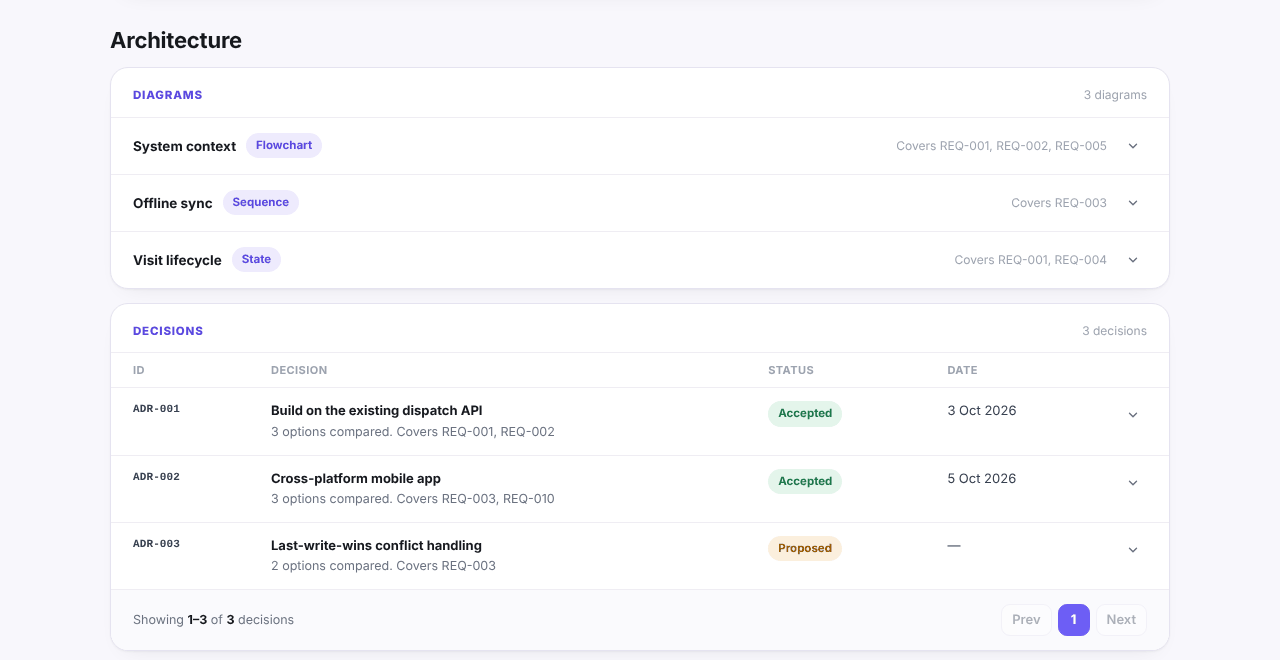
If a tool you are considering cannot show this kind of link, you will be keeping it in a spreadsheet.
Questions about data and privacy
Requirements material is often confidential: a client's plans, their systems, sometimes personal data. Before you upload anything, get plain answers to these questions, and ask for them in writing if the project is under a contract:
- Storage. Are uploaded files stored? Where, and for how long?
- Training. Is your content used to train models, by the tool or by its model provider?
- Model provider. Which company processes the text, and how long does it keep inputs and outputs?
- Sub-processors. Who else handles data (hosting, email, payments)? Is there a named list?
- Access. Who inside the vendor can see your content?
- Contract. Is there a data processing agreement, and does your contract with the client allow this use?
Client documents in AI tools: a checklist for agencies goes through each question and what a good answer sounds like. The difference between a personal chat account and a business product on a commercial API is large, so check the plan, not only the brand.
Also check what the tool does with your input inside the product. A tool that treats uploaded text as untrusted data, and cannot take actions on its own, is safer than one that can. Ask how the product is protected against instructions hidden in the files you upload.
Cost and lock-in
Price is rarely the main cost. Compare these:
- How usage is charged. Per seat, per project, or metered by AI usage. Metered plans can be cheap for light use and surprising for heavy use. Ask what happens when the allowance runs out.
- What you can export. If the only copy of your requirements is inside the tool, leaving costs a rewrite. Check formats and whether exports are limited on the free tier.
- What happens to your data if you cancel. Is it deleted, how fast, and can you take a copy first?
- How much process you must adopt. A heavy tool saves effort only if your team will use all of it.
- The time you spend. A tool that saves ten minutes per section but needs an hour of correction is slower than a template.
For one example, Discovery Phase AI has a free plan, paid plans with more projects and files, AI usage counted in credits, and Markdown export on the free plan, with PDF, Word and PowerPoint on paid plans. The details are on the pricing page. Use the same questions on any alternative.
A short buying checklist
- Define the job. One document, or a multi-week discovery with several reviewers? Write it in one sentence.
- Pick the three or four rows from the table that matter most to that job.
- Check data handling with the six questions above. Stop if the answers are vague.
- Run a pilot on real material you are allowed to use, or a realistic invented project. Give every tool the same input.
- Read the outputs critically. Trace each number and name back to the source. Count what was invented and what was left empty.
- Try changing something late. Edit one requirement and see whether you can tell what else it affects.
- Export and read the result as the client would.
- Compare the total cost, including the time spent correcting.
For the review step, a routine for checking AI drafts before a client sees them is in AI for software discovery. If you are still deciding whether a discovery phase is needed at all, do you need a discovery phase lists the signs.
You can also look at a finished result before you choose anything: the example report is a complete discovery for an invented project, and needs no sign-up.