User Flow Diagram Examples You Can Write as Text
· 7 min read
A user flow shows the steps a person takes to reach a goal, including the points where something can go wrong. You can write one as plain text with Mermaid, a diagram language that turns a few lines into a flowchart. Below are three examples you can copy and edit: sign-up, checkout with a failure path, and an approval flow.
What a user flow shows
A user flow answers three questions about one task:
- What does the person do, and in what order? Each step is a box.
- Where does the path split? Each decision is a diamond with a labelled arrow per answer.
- What happens when it fails? The failure paths are the reason to draw the flow at all. The happy path is usually obvious; the missing message, the expired link and the declined card are what get forgotten.
In discovery, a flow sits between a journey and a requirement. A journey tells the story ("a technician closes a visit"). The flow shows the logic behind one step of it. Each decision in the flow becomes a requirement or an acceptance criterion, which is why it is worth drawing before the requirements are final.
Mermaid draws these from text. The syntax is small. A diagram starts with flowchart and a direction (TD is top to bottom, LR is left to right); a step is a name with square brackets, a decision is a name with curly braces, and a label on an arrow goes between pipes (Mermaid flowchart documentation):
flowchart LR
    A[Start] --> B{Is it valid?}
    B -->|Yes| C[Save]
    B -->|No| D[Show error]
The conventions used below: a rounded box (([...])) marks where the flow starts or ends, a square box is a step, and a diamond is a decision.
Example 1: sign-up
The goal: a visitor creates an account and confirms their email. The failure paths are invalid details and a confirmation link that is not opened in time. The 48-hour limit is an example value; use your own.
flowchart TD
    A([Visitor opens sign-up]) --> B[Enters email and password]
    B --> C{Details valid?}
    C -->|No| D[Show what to fix]
    D --> B
    C -->|Yes| E[Create account]
    E --> F[Send confirmation email]
    F --> G{Link opened within 48 hours?}
    G -->|Yes| H([Account confirmed])
    G -->|No| I[Offer to send a new link]
    I --> F
What this flow turns into:
- A requirement for the validation rules, and for the message that names the field to fix.
- A requirement for the expiry of the link and for sending a new one.
- A question for the client: may the person use the product before the email is confirmed?
That last question is the kind of thing the flow exposes. In a paragraph of text it hides; in a diagram, the arrow that goes straight from "Create account" to a confirmed state is missing, and you can see it.
Example 2: checkout with a failure path
The goal: a customer pays for a basket. Most of the logic here is about what happens when the payment does not go through, so the flow has three outcomes from the provider: approved, declined and no response.
flowchart TD
    A([Customer clicks Pay]) --> B[Check stock]
    B --> C{In stock?}
    C -->|No| D[Show out-of-stock message]
    D --> Z([Back to basket])
    C -->|Yes| E[Send payment to provider]
    E --> F{Payment result}
    F -->|Approved| G[Create order]
    G --> H[Send receipt]
    H --> I([Order confirmed])
    F -->|Declined| J[Show reason, keep basket]
    J --> K{Try another method?}
    K -->|Yes| E
    K -->|No| Z
    F -->|No response| L[Mark payment as pending]
    L --> M[Check status after a delay]
    M --> F
What to take from it:
- The "no response" branch is the one that costs money. If the provider does not answer, the system must not create a second charge or lose the order. The flow forces the question: what is the state of the order while the payment is pending?
- The loop back to the provider and back to the check shows that the same step can run more than once. That affects testing: a tester needs a case for a retry.
- Every failure path needs a message. Each arrow that does not end in "Order confirmed" becomes a screen or a message that someone must write.
Example 3: an approval flow
The goal: an employee asks for something that needs approval, such as a purchase or a change. The route depends on an amount, and a rejection can lead to a resubmission. This one is drawn left to right.
flowchart LR
    A([Employee submits request]) --> B{Amount over limit?}
    B -->|No| C[Manager reviews]
    B -->|Yes| D[Manager and finance review]
    C --> E{Approved?}
    D --> E
    E -->|Yes| F[Notify employee]
    F --> G([Done])
    E -->|No| H[Return with a comment]
    H --> I{Employee resubmits?}
    I -->|Yes| A
    I -->|No| J([Closed])
What to take from it:
- The limit is a business rule. The flow says there is one; a requirement must say what it is and who can change it.
- Two paths join at "Approved?", so the system needs one place that handles the result whichever route came before.
- A returned request must keep its history, because the loop goes back to the start. That is a requirement the happy path never shows.
- Roles are implied. Manager and finance are different permissions, which belongs in the requirements.
Keeping flows next to the requirements
Why write flows as text instead of drawing them in a design tool?
- They survive edits. Changing a label or adding a branch is a one-line edit, not a re-layout of boxes. The layout is automatic.
- They can be compared. A text diagram can be reviewed line by line, so a change shows exactly what moved. An exported picture shows only that something looks different.
- They can live where the requirements live. A flow in the same document or repository as the requirement it explains is easier to keep in step with it.
- Anyone can fix them. A typo in a picture needs the original file; a typo in text needs a keyboard.
The trade-off is control: you cannot place boxes exactly, and a very large flow becomes hard to read. If a diagram needs more than 15 to 20 boxes, split it into two flows.
Link each flow to the journey and the requirements it supports, and say which ones. In the example report of an invented project, Fieldwise, flows are stored as Mermaid text and shown as diagrams. Each flow is used in a journey. The list below shows the actors, journeys and flows for the project, with the status of each flow:
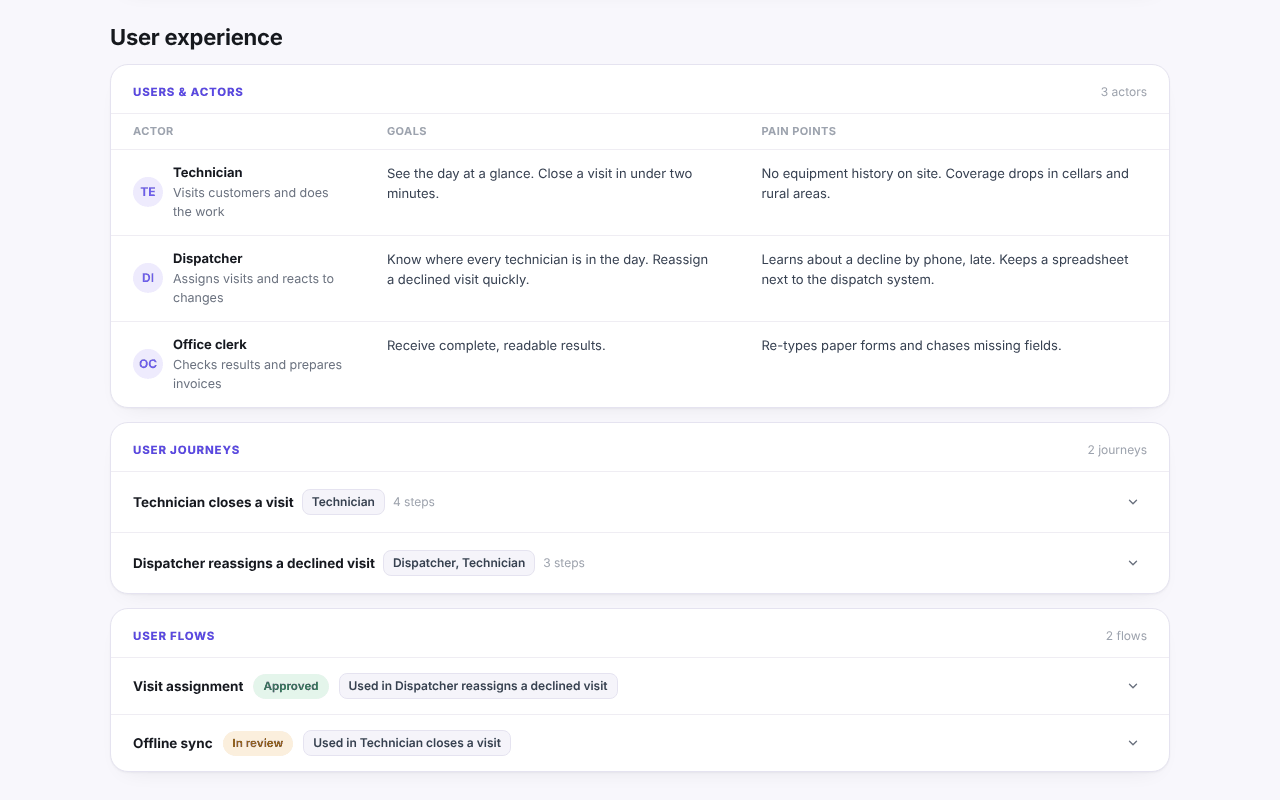
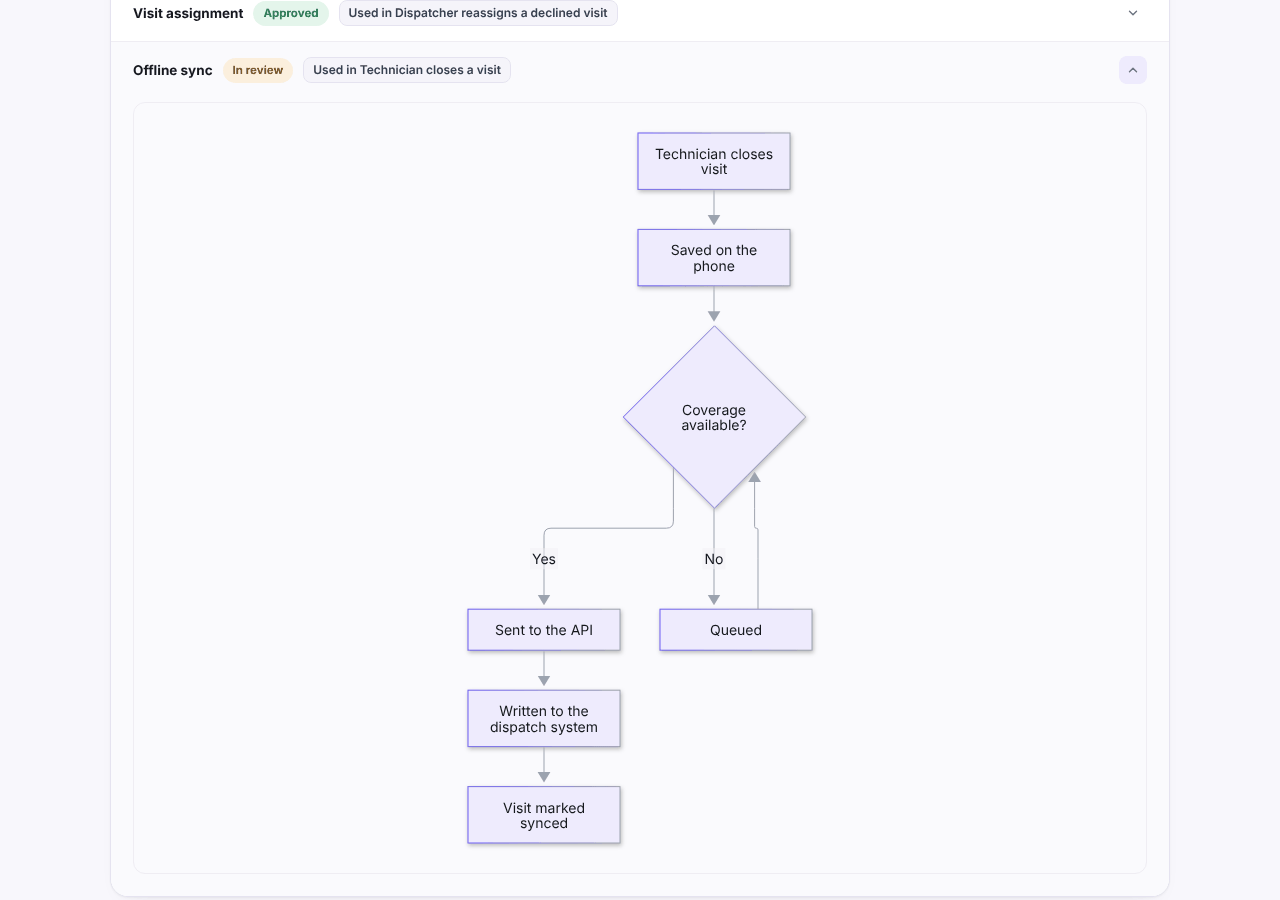
Opening the offline sync flow shows the diagram that the text produces: a technician closes a visit, it is saved on the phone, and the flow splits on whether coverage is available.
Once a flow exists, check it against the requirements: every decision should appear in at least one requirement or acceptance criterion, and every failure path should have a message. The software requirements document template shows where flows fit in a requirements document, and functional requirements examples shows how to turn each branch into a testable line. When flows feed the plan, they also shape the roadmap: a flow with an integration in it usually needs an early milestone to try it. You can open the example report to see the full set.