Software Project Risk Register Template (15 Example Risks)
· 8 min read
A risk register is a table of things that might go wrong, each with how likely it is, how much it would hurt, who owns it and what you will do about it. For a software project, six columns are enough: the risk, probability, impact, owner, response and status. Below is the layout, a scoring scale you can start with, and 15 typical risks to adapt.
What a risk register is
A risk is something that has not happened yet. That separates it from a blocker, which is already stopping work, and from an open question, which is something you do not know but could find out. A project needs a place for all three, and they can live in one list as long as each item has a type. In the example report of an invented project, Fieldwise, the list is typed in exactly that way: a blocker on another team's API, risks about sync and coverage, and open questions about confirmation and ownership.
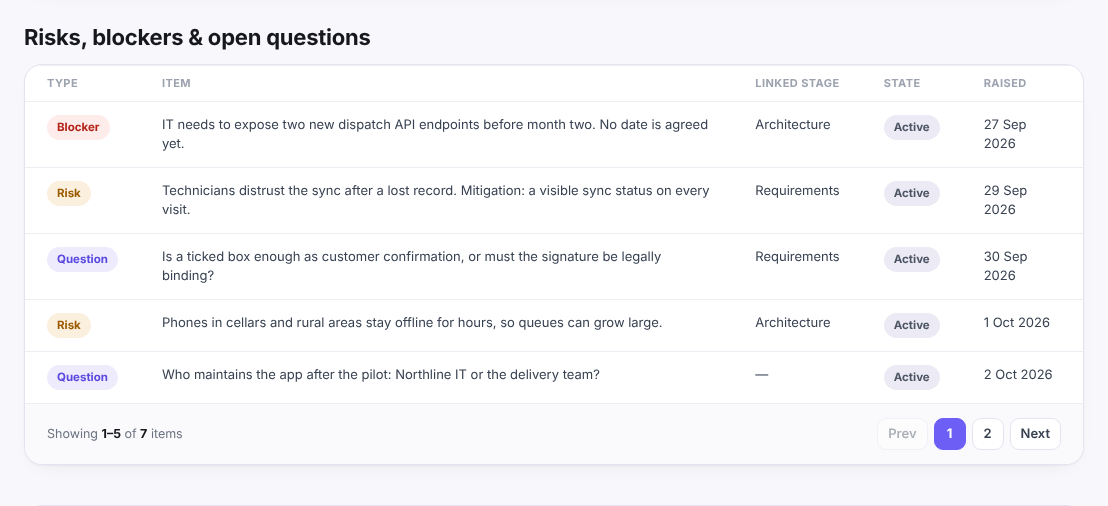
The register has three jobs in discovery. It shows the sponsor what could change the estimate. It tells the build team which parts to look at first. And it gives each uncertain item a person, so nobody assumes that someone else is watching it.
The columns that matter
You can add more, but these six are the ones people use:
| Column | What goes in it |
|---|---|
| Risk | One sentence in the form "If X happens, then Y", so the effect is part of the description |
| Probability | How likely it is, on a small scale (see below) |
| Impact | What it does to cost, date or quality if it happens, on the same scale |
| Owner | One named person, not a team |
| Response | The next action: what you will do first |
| Status | Open, being handled, closed or happened |
Two optional columns are useful on larger projects: the stage or requirement the risk touches, and the date raised, so old items stand out at review.
Write the risk so that it cannot be mistaken for a task. "API documentation" is a task. "If the dispatch API is not documented before build starts, the integration estimate may double" is a risk.
How to score probability and impact
A common starting point is a scale of 1 to 5 for both, multiplied to give a score from 1 to 25. This is a convention, not a standard, and you can use low, medium and high if you prefer. What matters is that the team uses one scale.
| Score | Probability | Impact |
|---|---|---|
| 1 | Very unlikely | Barely noticeable |
| 2 | Unlikely | Small delay or extra cost |
| 3 | Possible | A milestone moves or part of the scope is cut |
| 4 | Likely | The release date or budget is at risk |
| 5 | Almost certain | The project cannot deliver its goal |
A score of 15 or more usually needs a response before the work starts. A score under 6 can be watched. These thresholds are judgment calls, so decide them with the sponsor in the first week and write them at the top of the register.
For each risk that scores high, choose one of four responses: avoid it by changing the plan, reduce it by doing something now, transfer it to someone better able to carry it, or accept it knowingly and say so in writing.
15 example risks for a software project
These are typical rather than real: invented scores for an imaginary project, to show the shape. Your probabilities and impacts will differ, so score your own.
| # | Risk | P | I | Score | First response |
|---|---|---|---|---|---|
| 1 | If the integration API is undocumented, the integration estimate may double | 4 | 5 | 20 | Run a technical spike in discovery and ask for sample calls |
| 2 | If nobody has authority to decide, questions wait for weeks | 4 | 4 | 16 | Name one decision maker and an answer time |
| 3 | If the existing data is dirty or incomplete, migration takes much longer | 4 | 4 | 16 | Inspect a sample of real data before estimating |
| 4 | If the other team's API is not ready when build starts, the dependent milestone slips | 3 | 5 | 15 | Get a release date in writing; plan work that does not need it first |
| 5 | If the date or budget is fixed before the scope is clear, something has to give | 3 | 5 | 15 | Agree what is cut first if estimates exceed the number |
| 6 | If requirements change after sign-off, estimates stop matching the work | 4 | 3 | 12 | Use a change-request routine with a price per change |
| 7 | If one person knows the legacy system, their absence blocks decisions | 3 | 4 | 12 | Record what they know; name a backup |
| 8 | If users reject the new process, the product is built but not used | 3 | 4 | 12 | Involve users in discovery interviews and a pilot |
| 9 | If two senior stakeholders want different things, scope drifts | 3 | 4 | 12 | Put the disagreement on the list and escalate to the sponsor |
| 10 | If the estimate is one number, unknowns are treated as certain | 4 | 3 | 12 | Give ranges with written assumptions |
| 11 | If extra requests arrive unpriced, scope grows without cost | 4 | 3 | 12 | Keep a signed in, out and later list |
| 12 | If a privacy or accessibility rule appears late, rework follows | 2 | 5 | 10 | Ask legal and security in the first weeks |
| 13 | If no test environment exists, testing starts late and runs on guesses | 3 | 3 | 9 | Ask for access and test data early |
| 14 | If users work on weak networks, the app feels broken | 3 | 3 | 9 | Add an offline or slow-network requirement and test for it |
| 15 | If the product depends on one provider, switching later is costly | 2 | 3 | 6 | Note the dependency; decide when to revisit |
Items 1 to 5 would be handled before anything else. Items 13 to 15 can be watched.
Keeping it alive after discovery
A register that is written once and never read is a document, not a tool. Three habits keep it useful:
- Review it weekly for ten minutes, starting with the highest scores and anything past its date.
- Move closed items out of sight but do not delete them; the reason a risk was closed is useful later.
- Hand it over. The build team should receive the register with the estimate, because the assumptions behind the estimate are the same uncertainties. The open questions and assumptions log explains how the two lists connect.
It also helps to look at who is on the project: a stakeholder analysis finds people-related risks (a gatekeeper nobody asked, two senior opinions that conflict) before they appear in the register as problems.
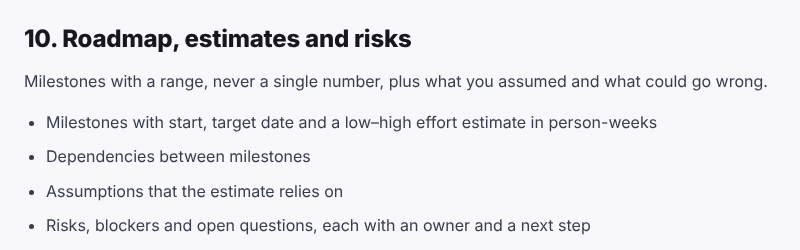
The discovery phase template ends with a roadmap and risks section that asks for the same things, each risk, blocker and open question with an owner and a next step:
You can open the discovery phase template for the full list of sections, and the example report to see a finished list in context. The Fieldwise project in it is invented.