Stakeholder Analysis for Software Projects: A Template
· 8 min read
A stakeholder analysis for a software project is a short table of the people who can shape, block, use or pay for the product, with what each of them needs and how much say they have. You build it in the first days of discovery, use it to plan interviews and sign-off, and keep it up to date until handover. This article gives you the columns, a power and interest grid, and an invented example you can copy.
Why discovery starts with people
Most of what a discovery phase has to find out lives in people's heads, not in documents. The sponsor knows the budget limit. The operations lead knows the workaround nobody wrote down. The security reviewer knows the rule that will stop a launch. If you do not know who these people are in week one, you find out about them in month four, when their objection costs a redesign.
A stakeholder list does three jobs in discovery:
- It is your interview plan. Each row is someone to talk to, or a deliberate decision not to.
- It tells you who signs off. Requirements, the estimate and the final report each need an owner who can say yes.
- It shows the conflicts early. Two senior people who want different things is a finding, not a scheduling problem.
If you are new to the wider process, the overview of the discovery phase in software development explains where this step sits among the others.
Who counts as a stakeholder
Anyone who can change the outcome, or whose work the outcome changes. On a software project that usually means more people than the client's contact list suggests. Go through these groups and write down names, not departments:
- Sponsor and budget holder. Who pays, and who can cancel the project.
- Product owner or day-to-day decision maker. Often not the sponsor.
- End users. Split them by role: the field technician and the dispatcher use the same system very differently.
- People who run it afterwards. Support, IT operations, whoever answers the phone when it breaks.
- Owners of systems you integrate with. The CRM admin, the finance system owner, the vendor's account manager.
- Gatekeepers. Security, legal, data protection, procurement, accessibility. They rarely ask for features; they say no late if nobody asked them early.
- The delivery team. The tech lead and designer on your side are stakeholders too: they own the estimate.
- Outside parties. Regulators, partners, the client's own customers, where they are affected.
A useful test for each candidate: "If this person saw the finished product for the first time at launch, could they stop it or make it fail?" If yes, they belong on the list.
What to record for each person
Keep the columns few enough that the table gets filled in. These are the ones that earn their place in software work:
| Column | What goes in it | Why it matters |
|---|---|---|
| Name and title | The person, not the team | You interview people |
| Organization | Client, vendor, partner, your team | Shows who you can reach directly |
| Role in the project | Decides, advises, uses, runs, gatekeeps | Sets how you involve them |
| Power | High or low: can they change scope, budget or the go-live date? | Drives the grid below |
| Interest | High or low: how much does the outcome affect their work? | Drives the grid below |
| What they need | One sentence in their words | Becomes goals and requirements |
| What they decide or sign off | Budget, scope, security review, data model | Your approval path |
| Concerns or position | Supportive, neutral, sceptical, and why | Shows conflicts early |
| Contact and best channel | Email, chat, a weekly call | Saves chasing |
If you want a shorter starting point, the stakeholders section of our discovery phase template asks for the essentials and says when the section is done:
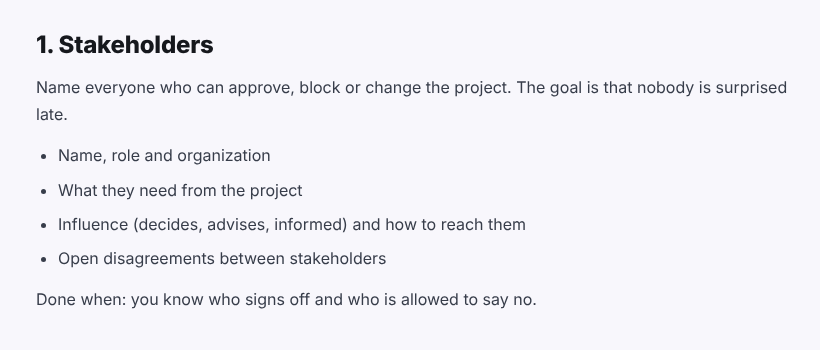
Two cautions. First, power and interest are your judgement, not a fact about the person, so keep the table among the team and word the notes as you would want them read aloud. Second, a stakeholder list holds personal data (names, roles, contact details, opinions). Store it where the project's other confidential material lives and share it on the same terms.
Power and interest: a grid you can use
The most common way to sort the list is a two-by-two grid of power against interest, usually credited to Aubrey Mendelow's 1991 work on stakeholder mapping. The Nielsen Norman Group's guide to stakeholder analysis describes the same four groups. In discovery terms:
| Low interest | High interest | |
|---|---|---|
| High power | Keep satisfied. Short updates, ask for their decision only where it is theirs to make. | Manage closely. Interview early, review drafts, sign off. |
| Low power | Monitor. Inform at milestones. | Keep informed. Interview for detail; they often know how the work is really done. |
The grid is a starting point, not a verdict. Two things change it during discovery:
- Interest rises when people see specifics. A finance director who ignored the kickoff becomes very interested when a requirement touches invoicing. Move them.
- Low power does not mean low value. End users rarely sit in the high-power box, yet their interviews produce most of the journeys and requirements. Plan their time as carefully as the sponsor's.
Using the list: interviews, sign-off, communication
Once the table exists, turn it into three plans.
Interviews. Book everyone in "manage closely" and a sample of "keep informed" first, usually the sponsor, the decision maker, two or three end users per role, and each integration owner. Send each person the question you most need them to answer, so the session is not spent on background. Record which answers were confirmed by more than one person and which rest on a single voice.
Sign-off. For each deliverable, name the one person who approves it. Common splits: the sponsor approves goals and the budget range, the product owner approves requirements and priorities, the tech lead and the systems owners approve the architecture, and gatekeepers approve what touches their area. Write it down before the work starts; an approval path invented at the end invites a second round.
Communication. Match the channel to the box in the grid: a weekly call for "manage closely", a short written update at each milestone for "keep satisfied" and "keep informed", nothing more than the final report for "monitor".
Disagreements found along the way go to the open questions and risks log with an owner and a date, not into the requirements as a compromise nobody agreed to.
A filled-in example (invented)
The project below is made up: a mid-sized utilities company replacing its paper-based field inspection process with a mobile app.
| Name and title | Role | Power / interest | What they need | Signs off | Position |
|---|---|---|---|---|---|
| Dana Ortiz, Head of Field Operations | Sponsor | High / high | Fewer repeat visits, faster reports | Budget range, go-live | Supportive |
| Sam Patel, Operations Manager | Decision maker | High / high | One tool that works offline | Requirements, priorities | Supportive, worried about training time |
| Field technicians (3 interviewed) | End users | Low / high | Forms that fit a phone in gloves | Usability test results | Sceptical after a failed pilot |
| Lee Chen, IT Security Lead | Gatekeeper | High / low | Device management, data stays in region | Security review | Neutral, needs early sight of the data flow |
| Morgan Reyes, Finance Systems Owner | Integration owner | Low / high | Inspection results feed billing without retyping | Interface spec | Neutral |
| Alex Kim, Tech Lead (delivery team) | Delivery | High / high | Clear integrations before estimating | Architecture, estimate | Supportive |
Read across a row and the next steps write themselves: the security lead needs the data-flow diagram before the architecture is final, the technicians' scepticism is a risk to record, and the finance owner's need becomes a requirement with an acceptance criterion.
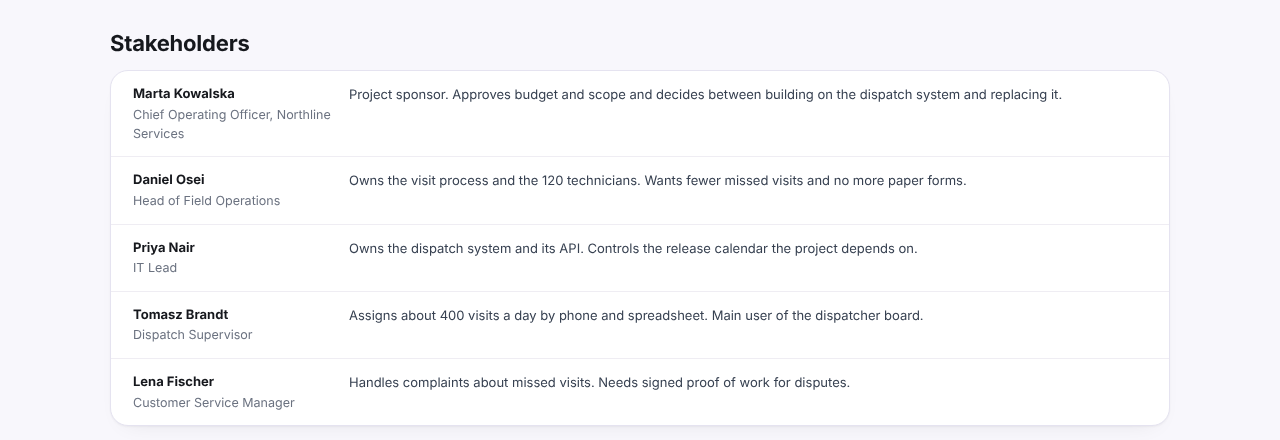
In a finished report the list gets shorter: a name, a title and one line on what each person owns or decides. This is how it looks in our example report, written for an invented project called Fieldwise (all names are made up):
In Discovery Phase AI, the Stakeholders stage keeps each person's name, title, contact details and a free-text description for influence and involvement, and the AI can draft that list from uploaded meeting notes or decks for you to review before anything is saved.