How to Scope a Software Project: A Step-by-Step Guide
· 7 min read
To scope a software project, start from the goals, list the users and what they need, turn that into prioritised requirements, and then write down explicitly what is in, what is out and what comes later. Estimate the in-scope work as a range with its assumptions, and get one decision maker to sign the result. The seven steps below follow that order; the in, out and later list in step 5 is the artifact that does most of the work.
What scope is, and what scope creep is
Scope is the agreed list of what the project will deliver, and just as importantly, what it will not. It is not the same as the requirements: requirements describe what the product must do, while scope sets the boundary of this particular piece of work, usually one release.
Scope creep is what happens without that boundary. The PMI defines it as the uncontrolled expansion of project or product scope without matching changes to time, cost and resources (PMI, Scope and stakeholder management). The key word is uncontrolled: scope can change, and often should, but each change needs a visible decision about what it costs and what moves out.
Scoping well is mostly done during the discovery phase. If you want the wider context, see what a discovery phase is in software development.
Step 1-2: goals and users
Step 1: Write two or three goals with numbers
Everything else is judged against the goals, so start there. A goal says what changes for the business or the user, with a metric, today's value, a target and a date. "Improve onboarding" is not a goal; "cut the time from sign-up to first invoice from 3 days to 1 day by June" is.
Ask the decision maker to rank the goals. When two features compete for the same week, the ranking decides.
Step 2: List the users and what they are trying to do
Name each type of user (and each external system the product talks to) and the main job they need to get done. Then walk through the main journey of each, step by step, and mark where it goes wrong today. Talk to people who will use the product, not only to the people who pay for it.
This step catches the most expensive scope gaps: the admin role nobody mentioned, the approval step that exists only in one manager's head, the data import that has to happen before anyone can use the product at all.
Step 3-4: requirements and priorities
Step 3: Turn needs into testable requirements
For each journey, write what the product must do as short, testable requirements: one behaviour each, with acceptance criteria someone else can check. Separate three kinds:
- Functional: what the product does ("a dispatcher can reassign a job").
- Non-functional: how well it does it ("the job list loads within 2 seconds").
- Constraints: what cannot change ("data stays in the EU", "must use the client's existing login").
Link every requirement to a goal. A requirement with no goal behind it is the first candidate for "later".
Step 4: Prioritise with MoSCoW
Mark each requirement Must, Should, Could or Won't (this time). The test for a Must is blunt: would the release be useless, illegal or unsafe without it? If not, it is a Should.
Keep the Musts in proportion. The DSDM guidance from the Agile Business Consortium recommends that Must Have work stay at no more than about 60% of the effort, leaving the Shoulds and Coulds as room to absorb surprises. If almost everything is a Must, the priorities have not been set yet.
Step 5: in, out and later
This is the step that prevents most scope arguments. Take the prioritised list and sort every item into one of three columns, then write the result down as its own short section of the scope document.
| In (this release) | Out (not this project) | Later (a known next step) |
|---|---|---|
| All Musts | Things you decided not to build at all | Shoulds and Coulds that did not fit |
| Shoulds that fit the budget | Ideas that do not serve a goal | Features waiting on a dependency or a decision |
| Constraints, always | Work someone else owns (another team, the client) | Second user types or markets |
A few rules make the list useful:
- Write the "out" column in full sentences. "No native mobile app; the web app works on mobile browsers" is clearer than "mobile: out".
- Give "later" items a trigger, such as "after the pilot" or "once the payment provider is chosen", so they do not read as forgotten.
- Name who owns anything outside the team: data migration, content, third-party contracts, user training.
- Review the list with the decision maker line by line. Silence is not agreement.
The "out" column is the one people skip, and the one they need most when a new request arrives in week six: you can point at it and ask what should move to make room.
Step 6: estimate as a range
Estimate only the "in" column, and give a range rather than a single number. Early estimates are genuinely uncertain: in Steve McConnell's Cone of Uncertainty, an estimate made at the initial concept stage can be off by up to 4x in either direction, narrowing as requirements and design are completed (Construx). A single number hides that; a range shows it.
A practical way to do it:
- Group the in-scope requirements into milestones that each deliver something a user can see.
- Estimate each milestone as low-high effort, for example in person-weeks.
- Write the assumptions each estimate relies on ("the dispatch system's API is documented and available in test", "the client supplies content by week 4").
- List the main risks and what you would do if one happens.
The assumptions are part of the estimate, not a footnote. When one turns out to be false, the estimate is expected to change, and everyone can see why.
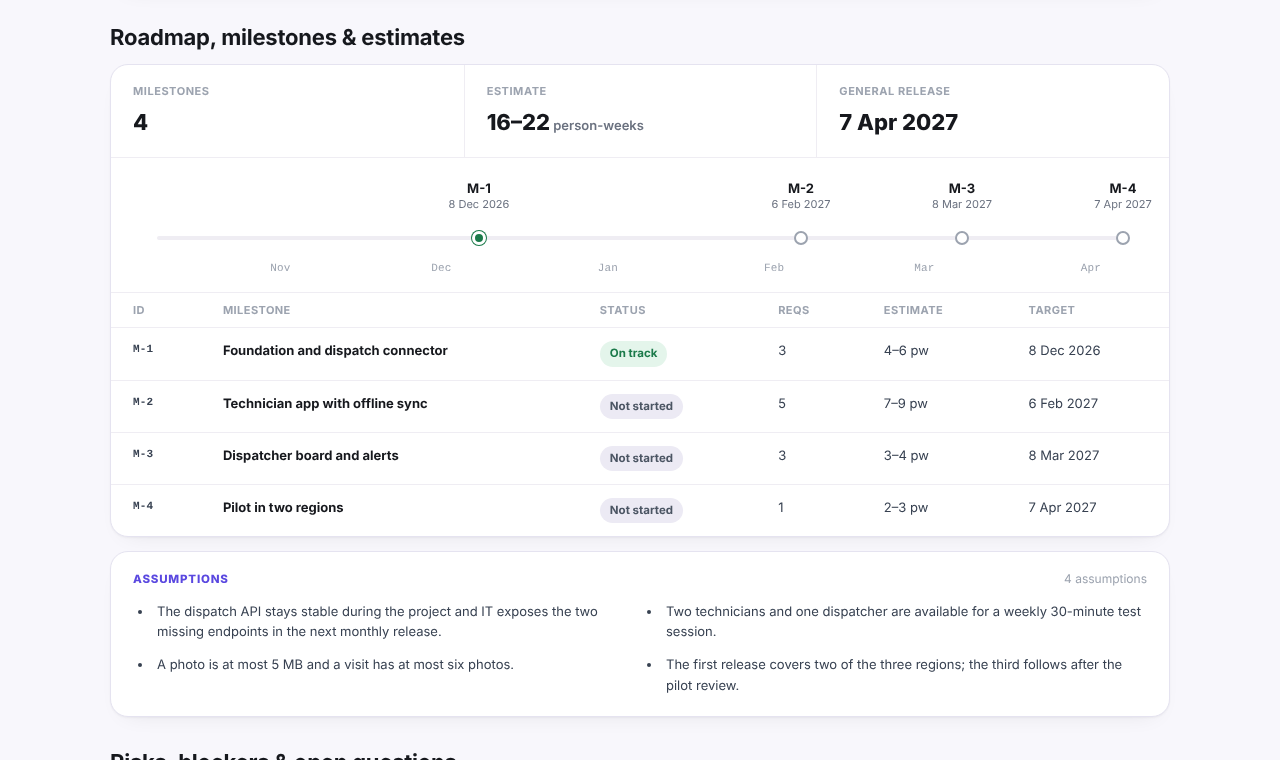
Here is what that looks like in the public example report, for an invented project called Fieldwise: four milestones, each with a person-week range, a total of 16-22 person-weeks, and the assumptions listed right under them.
Step 7: get the scope signed
The final scope statement can be short. It should contain:
- The goals and their metrics.
- The users and the journeys covered.
- The in-scope requirements, or a reference to the requirements document.
- The in, out and later list.
- The estimate range, milestones and assumptions.
- How changes will be handled: who can request one, who approves it, and how its cost is shown.
Ask the person who owns the budget to sign it, not only a project contact. For client work, the signed scope usually becomes the basis of the statement of work or the contract; that wording is a matter for the contract itself (and for a lawyer where needed).
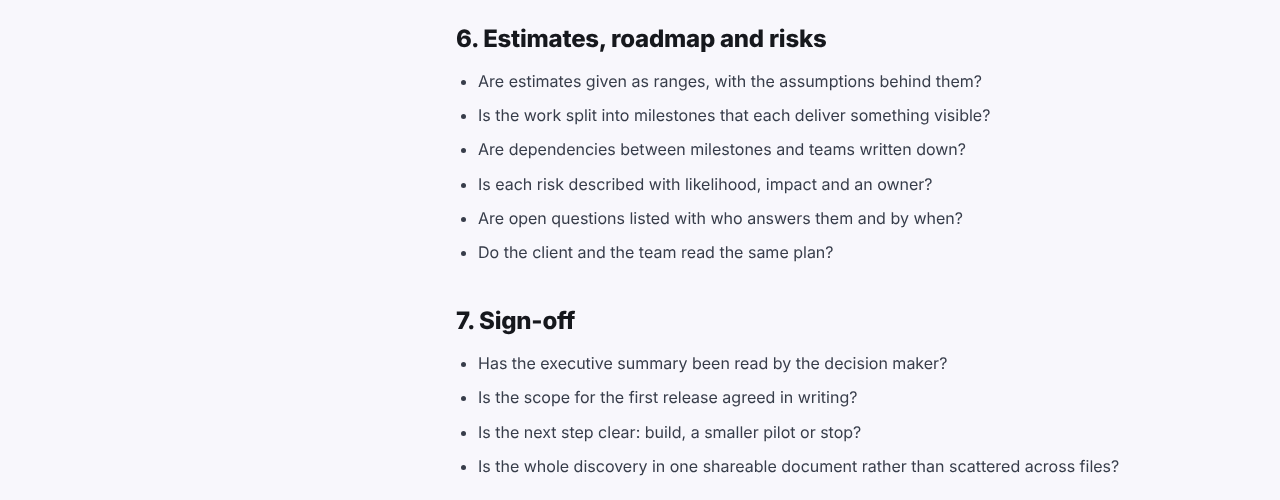
Before you ask for the signature, run the scope through the discovery phase checklist: an unanswered question there is a risk you can still fix cheaply.
If you keep the scope in one place rather than across files, it is also easier to keep current. In Discovery Phase AI, for example, requirements carry their MoSCoW priority and linked goal, and the roadmap stage holds milestones with a low-high person-week estimate next to the assumptions they depend on; the example report shows the whole invented project in that form.