How to Estimate a Software Project: Give a Range
· 7 min read
To estimate a software project, split the work into milestones, give each one a low, a likely and a high figure in person-weeks, write down the assumptions those figures rest on, and add a contingency with a stated rule for using it. The client gets a range they can budget against and a list of what would move it. This article walks through each step with an example table you can copy.
Why one number misleads
A single figure such as "26 weeks" sounds precise, but it hides how much is still unknown. Two people can agree on it while one hears "at most" and the other hears "about". When the project lands at 31 weeks, the conversation is about broken promises rather than about which assumption changed.
Estimation research explains why a range is more honest. Steve McConnell's "cone of uncertainty", based on Barry Boehm's work, describes estimates made at the initial-concept stage as being off by up to 4x in either direction, narrowing as requirements, design and decisions are settled (Construx). McConnell presents those bounds as close to the best case a skilled estimator can reach at each point, not the worst. A finished discovery phase puts you further along the cone than a first sales call, but not at the end of it.
So the job is not to make the uncertainty disappear. It is to show it, explain where it comes from, and say how it will shrink.
Break the work into milestones
Estimate milestones, not the project as a whole. A milestone is a result someone can see ("Technicians can complete a visit offline"), linked to the requirements it delivers. Splitting the work this way:
- Exposes the hard parts. An integration estimated on its own gets a wide range; buried in a project total, it disappears.
- Lets ranges differ. The first milestone, which the team understands best, can have a tight range while later ones stay wider.
- Makes trade-offs concrete. If the client wants a lower total, they can see which milestone or requirement to cut.
A rule of thumb: milestones of two to six weeks of effort are easy to estimate and to track. One milestone holding half the project is a sign it needs splitting. Every Must-have requirement should be linked to some milestone; anything unlinked is either out of scope or missing from the estimate.
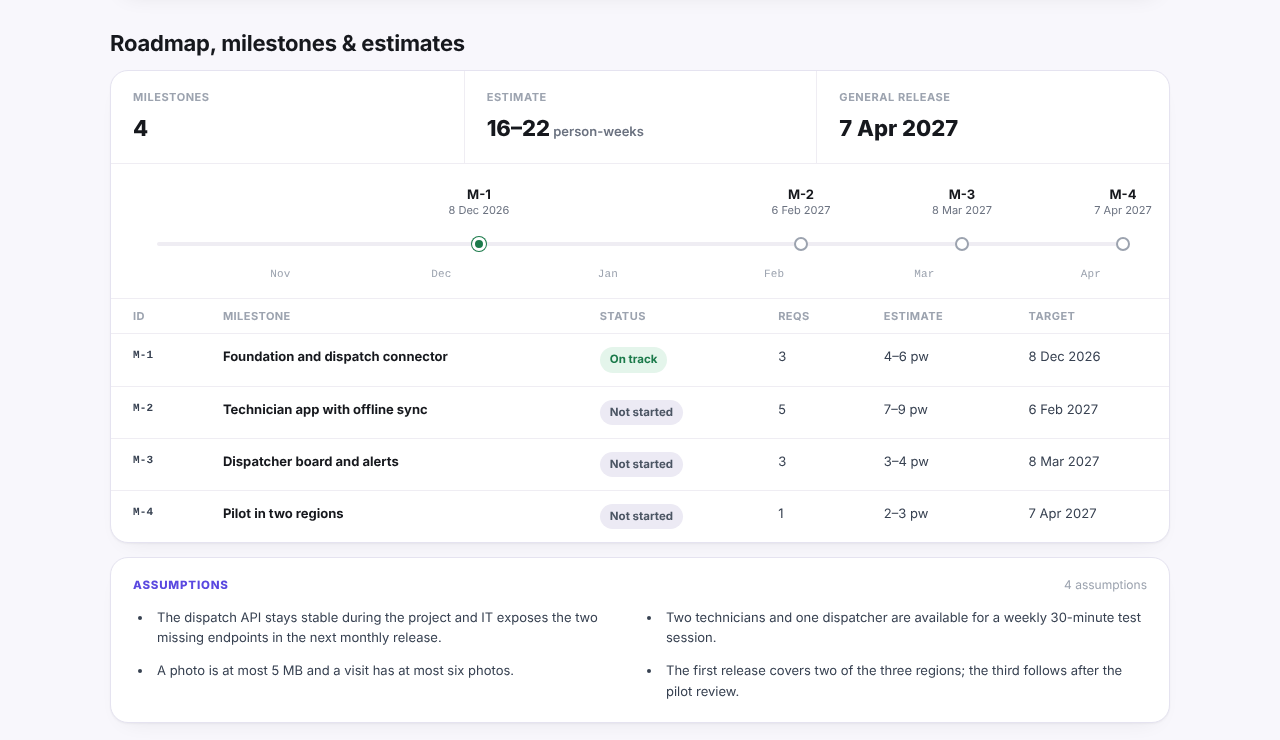
The screenshot above is from our example report, built for an invented project called Fieldwise: each milestone carries a low–high estimate, the total is shown as a range, and the assumptions sit right below the table.
Low, likely and high per milestone
For each milestone, ask the people who will do the work for three figures in person-weeks:
- Low: if the assumptions hold and nothing surprising turns up.
- Likely: what they would bet on.
- High: if the known risks happen, but not a catastrophe.
If you want one planning figure per milestone, the PERT formula weights the likely case: (low + 4 × likely + high) / 6 (three-point estimation). Use it for planning, but show the client the range.
An example for an invented field-service app, three developers and a designer:
| Milestone | Low (pw) | Likely (pw) | High (pw) | PERT (pw) | Main uncertainty |
|---|---|---|---|---|---|
| M1 Foundation and sign-in | 4 | 5 | 6 | 5.0 | Low: well-known work |
| M2 Offline technician app | 7 | 8 | 11 | 8.3 | Sync conflicts on poor connections |
| M3 Dispatch system integration | 4 | 6 | 10 | 6.3 | Partner API not yet documented |
| M4 Supervisor dashboard | 3 | 3.5 | 5 | 3.7 | Report formats not agreed |
| M5 Pilot and fixes | 2 | 3 | 5 | 3.2 | Number of pilot defects |
| Total | 20 | 25.5 | 37 | 26.5 |
Report the total as "20 to 37 person-weeks, most likely around 26". Sum the lows and the highs separately; do not average the range away. Note that the whole project is unlikely to hit every high at once, so the true spread is somewhat narrower than the simple sum; for a client-facing estimate the simple sum is easier to explain and errs on the safe side.
Person-weeks are effort, not calendar time. Turning them into dates needs the team size, how much of their time is on this project, holidays, and how much of the work can run in parallel.
Write the assumptions and exclusions
The range is only as good as the list of things it assumes. Write them as short, checkable sentences next to the estimate:
- Team: "Three developers and one designer, full time from 3 November."
- Third parties: "The dispatch API exposes the two missing endpoints by the end of month one."
- Client input: "Feedback on each milestone demo within three working days."
- Scope limits: "Two regions in the first release; the third later."
- Technical: "Photos up to 5 MB, at most six per visit."
Then list the exclusions: things a reader might expect but that are not in the figures, such as data migration from the old system, translations, app store submission, or ongoing hosting. An exclusion written down is a scope decision; one left unsaid is a future dispute.
Each assumption is also a trigger. If it turns out false, the estimate is reopened, and both sides already agreed that it would be.
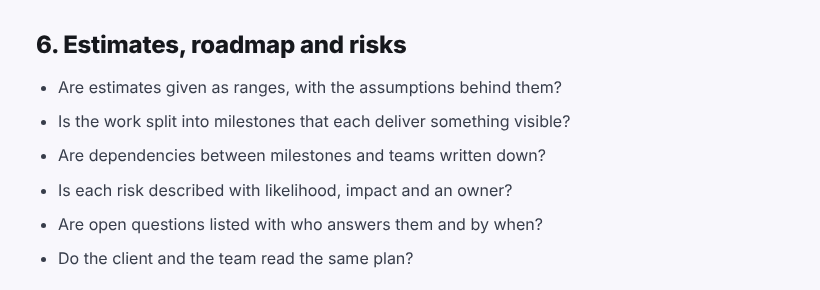
The discovery phase checklist uses the same test for this part of discovery: estimates as ranges, with the assumptions behind them, and each risk with an owner.
Add a contingency and say how it is used
Even a good range does not cover everything. A contingency is a separate, named amount for the unknowns nobody listed. Three things make it work:
- Keep it separate. Do not hide it inside the milestone figures, or nobody can tell estimate from buffer.
- Size it to the risk. There is no universal percentage. A common rule of thumb is to size it from the risk list: the wider the ranges on the riskiest milestones and the more external dependencies, the larger the reserve. Say what you based it on.
- Agree the rule for spending it. For example: the delivery lead may draw on it for work inside the agreed scope, reports each use at the next review, and any new feature is a change request, not contingency.
A contingency the client can see and track builds trust. One they discover later looks like padding.
Revisit the estimate at set points
An estimate made once and defended forever stops being true. Agree in advance when it will be revised:
- After the first milestone. The team's real pace is now known. Compare actual effort with the estimate and adjust the later ranges.
- When an assumption breaks. The partner API is late, the team changes, the scope grows.
- At each change request. Every addition gets its own low–high figure before it is accepted.
At each revision, the ranges for the remaining milestones should narrow. If they widen, that is information too: something important was unknown and is now visible.
For the wider picture of how estimates fit into discovery outputs, the overview of the discovery phase in software development lists the other deliverables. In Discovery Phase AI, the roadmap stage stores each milestone's estimate as a low and a high number of person-weeks, adds them up into a total range, and keeps the assumptions in a list next to the milestones.