Discovery Workshop Agenda: A Half-Day Plan You Can Copy
· 8 min read
A good discovery workshop takes about four hours, has five to eight people in the room, and ends with written decisions rather than a wall of sticky notes. The agenda below splits a half day into seven timed blocks, names the output each block must leave behind, and closes with how to turn the board into requirements the same week.
What the workshop is for
The kickoff workshop is one step inside a discovery phase, not a replacement for it. It is the one time the people who decide, the people who use the product and the people who will build it sit together. Use it for what only that group can do:
- Agree the problem and the goals, so later debates have a referee.
- Draw the scope line: what is in the first release and what is not.
- Surface the unknowns early: integrations nobody has checked, rules nobody wrote down, approvals nobody mentioned.
- Assign owners to every open question.
What the workshop is not for: estimating to the day, designing screens in detail, or choosing a technology stack. Those need homework the room has not done yet.
Do the reading first. Collect the decks, emails, old specs and call notes that already exist and read them before you book the session, so the room is not spent re-stating what is on paper.
Who to invite
Five to eight people is a workable size; above ten, most people listen instead of contributing. Cover these roles, even if one person holds several:
| Role | Why they must be there | Can they send a deputy? |
|---|---|---|
| Decision maker (sponsor, budget holder) | Approves goals, scope and trade-offs | No: decisions made without them get reopened |
| Product owner on the client side | Owns priorities day to day | Only one who can decide |
| One or two real users or their manager | Know how the work is done today | Yes, if the deputy does the work |
| Subject-matter expert (operations, finance, compliance) | Knows the rules and edge cases | Yes |
| Tech lead from the delivery team | Spots integration and feasibility risk | No |
| Designer or business analyst | Draws journeys, captures requirements | Yes |
| Facilitator | Keeps time, keeps the outputs coming | Should not be the decision maker |
Send the agenda, the goals of the session and two or three pre-reading documents a few days ahead. Ask the decision maker to confirm attendance for the whole session, not just the opening.
The agenda, block by block
Times assume a 9:00 start and a four-hour session. Shift them as needed, but keep the order: each block uses the output of the one before.
| Time | Block | Output on the board |
|---|---|---|
| 9:00-9:15 | Introductions and rules | Names, roles, the decision maker named aloud |
| 9:15-9:45 | Problem and context | A two-sentence problem statement with evidence |
| 9:45-10:30 | Goals and success metrics | Two or three goals, each with a metric, baseline and target |
| 10:30-10:45 | Break | |
| 10:45-11:45 | Users and journeys | User types, one main journey each, pain points marked |
| 11:45-12:30 | Scope and priorities | A Must / Should / Could / Won't list for the first release |
| 12:30-12:50 | Risks, constraints and open questions | A list, each item with an owner and a date |
| 12:50-13:00 | Wrap-up | Next steps, who writes what, by when |
Problem and context
Ask for the problem without a solution in it. A useful template: [who] cannot [do what] because [cause], which leads to [impact]. Then ask how the room knows it is real: support tickets, numbers, quotes. If nobody has evidence, write that down as an open question.
Goals and success metrics
Every goal needs a number and a date. "Reduce time to onboard a new client from 10 days to 3 by the end of Q2" can be judged later; "make onboarding smoother" cannot. If the room cannot agree on the baseline, an action item to measure it is a fine output.
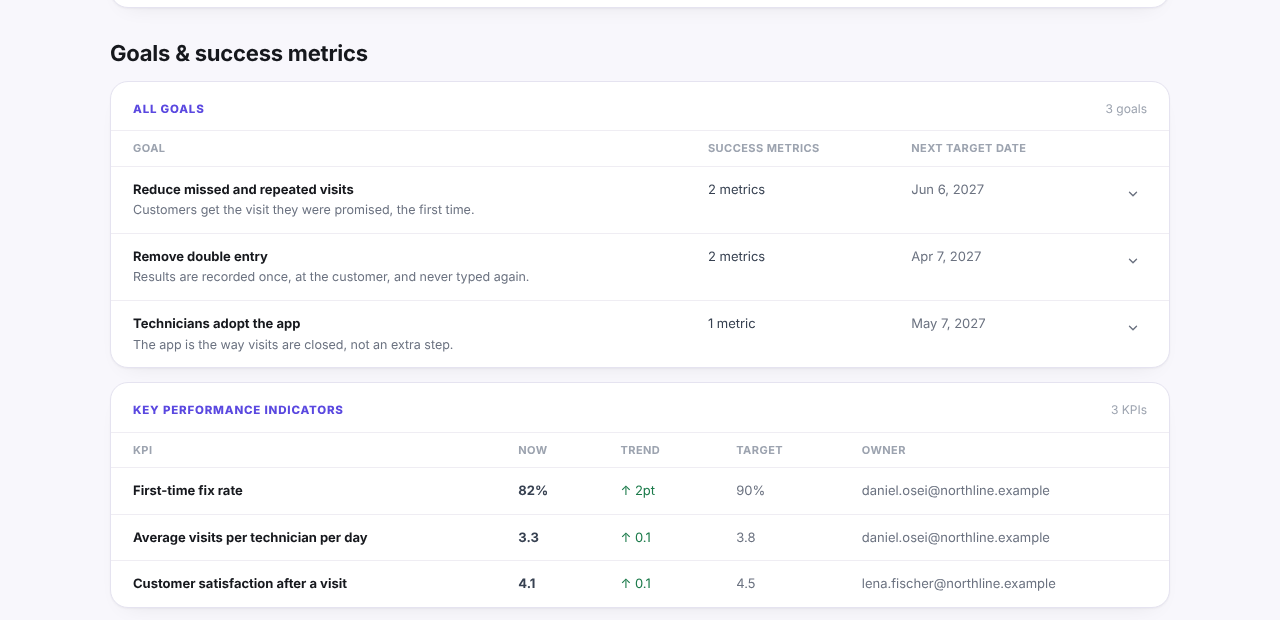
Written up, the output of this block can be as small as this, from the example report for Fieldwise, an invented field-service project: three goals, each with metrics and a target date, plus the KPIs to watch after launch.
Users and journeys
List the user types, then walk through the main journey of each, step by step, on the wall. Mark the steps where people wait, re-type data or give up. This block usually takes longest and surfaces the most requirements, which is why it gets a full hour.
Scope and priorities
Turn the journeys into a list of capabilities and sort them with MoSCoW: Must, Should, Could, Won't (this time). The test for a Must is blunt: if this were missing at launch, would we cancel the launch? The Agile Business Consortium's guidance suggests keeping Must effort to about 60% of the total so there is room for surprises. The Won't list matters as much as the Must list: it is the written record of what was ruled out.
Risks, constraints and open questions
Collect what could stop the project: a deadline tied to a contract, a system that must stay, a regulation, a team that has not agreed. Each item gets one owner and a date. An item without an owner will still be open at the next meeting.
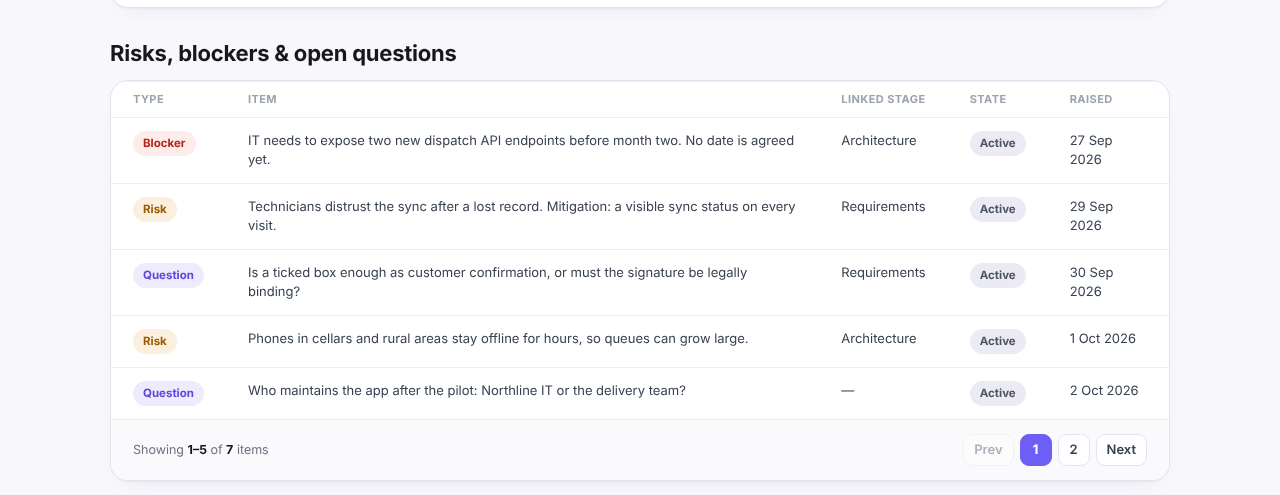
It also helps to sort the list into blockers, risks and open questions, and to note which part of the plan each one touches. In the Fieldwise example it looks like this:
Questions that surface hidden scope
Most scope surprises come from things everyone assumed and nobody said. These questions bring them out:
- "Who else touches this data before or after you?" (finds integrations and second user groups)
- "What happens when it goes wrong today?" (finds error handling, refunds, manual fixes)
- "Is there anything you do at month end, year end or audit time?" (finds reports and periodic jobs)
- "Who is allowed to see this, and who is not?" (finds roles, permissions and privacy rules)
- "What has to keep working while we build this?" (finds migration and parallel running)
- "Which spreadsheet would you be sad to lose?" (finds the real system of record)
- "What did the last attempt get wrong?" (finds the political and technical traps)
- "Who has to sign off before this goes live?" (finds approvals that are not in the plan)
Write each answer as either a requirement, a constraint or an open question. Do not let it stay as a remark in someone's notebook.
What to write down before people leave
The last ten minutes decide whether the workshop was worth four hours of senior time. Before anyone leaves, read aloud and get a nod on:
- The problem statement and the goals with their numbers.
- The first-release scope: the Must list and the Won't list.
- The open questions, each with an owner and a date.
- Who writes up what, and when the written version will be sent for review (within two working days is a reasonable target).
Then photograph every board and wall section, in order, with the block name visible.
From board photos to written requirements
Board photos are not a deliverable. Turn them into a document while the session is still fresh:
- Transcribe the problem and goals into the opening section, word for word where the room agreed on wording.
- Turn each journey step with a pain point into one or more requirements, written so a tester could check them, each with its priority from the scope block.
- Add acceptance criteria to every Must. If you cannot write one, that requirement is not understood yet; add it to the open questions.
- Link each requirement to the goal it serves. A requirement that serves no goal is either missing a goal or out of scope.
- Send the result to the attendees and ask for corrections by a fixed date, not "any feedback welcome".
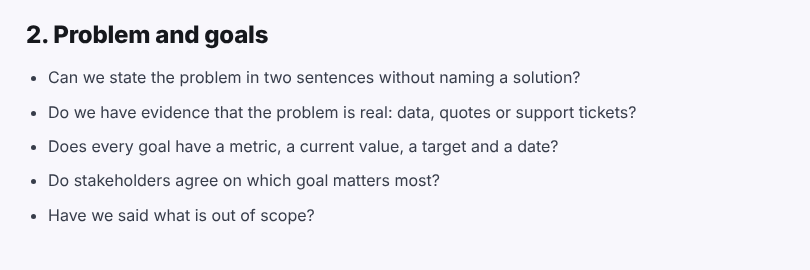
The discovery phase checklist is a useful final pass: if a section of it has unanswered questions, the next meeting already has an agenda. Its "Problem and goals" section, for example, maps directly onto the first two content blocks of the workshop:
If you recorded the session, Discovery Phase AI can read the transcript together with the board photos and draft goals, journeys and requirements (it fills acceptance criteria only where the source gives them) for you to review before anything is saved.